
Dashboard
La Dashboard è il centro di comando delle tue prestazioni di trading. Combina KPI a livello di periodo, viste di analisi fisse, rilevamento delle perdite di rendimento (leak), sezioni analitiche, un report di periodo algoritmico con prompt IA pronti da copiare e un layout di widget personalizzabile.
Controlli di periodo
L’analisi della Dashboard è delimitata dal periodo attivo. Usa i controlli nell’intestazione per passare da:
- 1M - ultimo mese.
- 3M - ultimi tre mesi.
- 1Y - ultimi dodici mesi.
- Personalizzato - un intervallo di date selezionato manualmente.
Il browser memorizza il preset selezionato, quindi aggiornando la pagina viene ripristinato lo stesso periodo. Quando scegli un intervallo personalizzato, la barra dei KPI, i widget, l’analisi dei punti deboli e i grafici si ricaricano tutti sulle stesse date.
Barra dei KPI
La barra dei KPI fissa rimane in cima alla Dashboard e riassume il periodo attivo. Utilizza gli stessi dati delle transazioni e la stessa modalità P&L del resto della pagina, quindi modificare il periodo o passare da P&L lordo a netto si riflette coerentemente su tutta la Dashboard.
Viste della Dashboard
La Dashboard dispone di quattro viste. Il browser ricorda la vista attiva per la visita successiva.
Generale
Generale mostra i grafici di prestazione principali:
- Curva dell’equity.
- Rendimento per giorno della settimana.
- Rendimento per orario della giornata.
Usala per comprendere rapidamente se le performance stanno migliorando e in quali fasce orarie o giorni si concentrano i rendimenti.
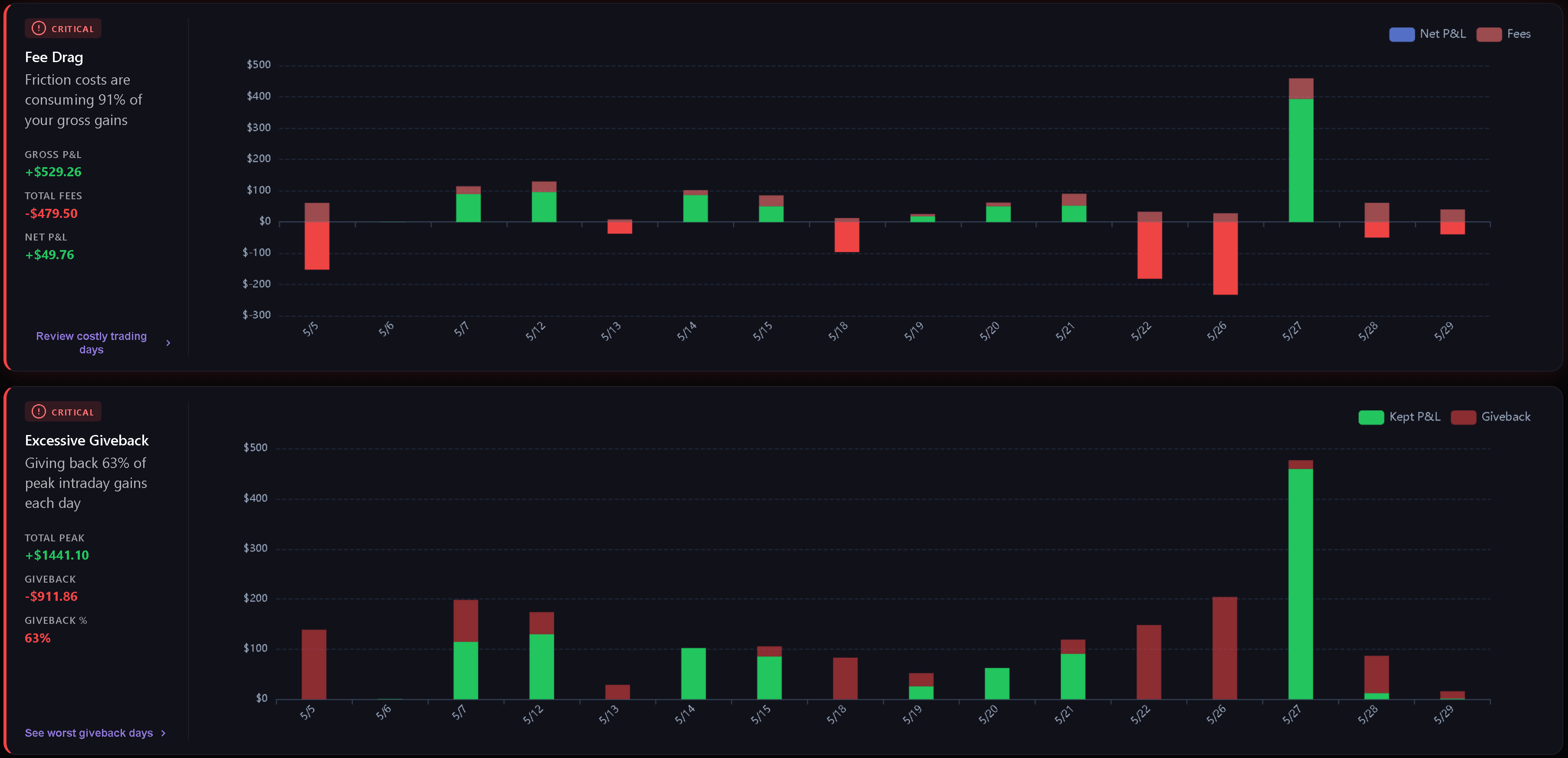
Punti deboli (Weaknesses)
Punti deboli rileva e ordina le perdite più importanti nel periodo selezionato, calcolate direttamente dalle tue transazioni.
Le categorie attuali includono:
- Impatto delle commissioni (Fee Drag) - quanta parte dei profitti lordi viene erosa da commissioni e costi.
- Giveback eccessivo - quanta parte del profitto massimo intraday viene restituita prima della chiusura.
- Asimmetria del tempo di detenzione - se le operazioni in perdita vengono mantenute molto più a lungo rispetto a quelle vincenti.
- Overtrading - quante volte il numero di trade giornalieri supera la soglia configurata.
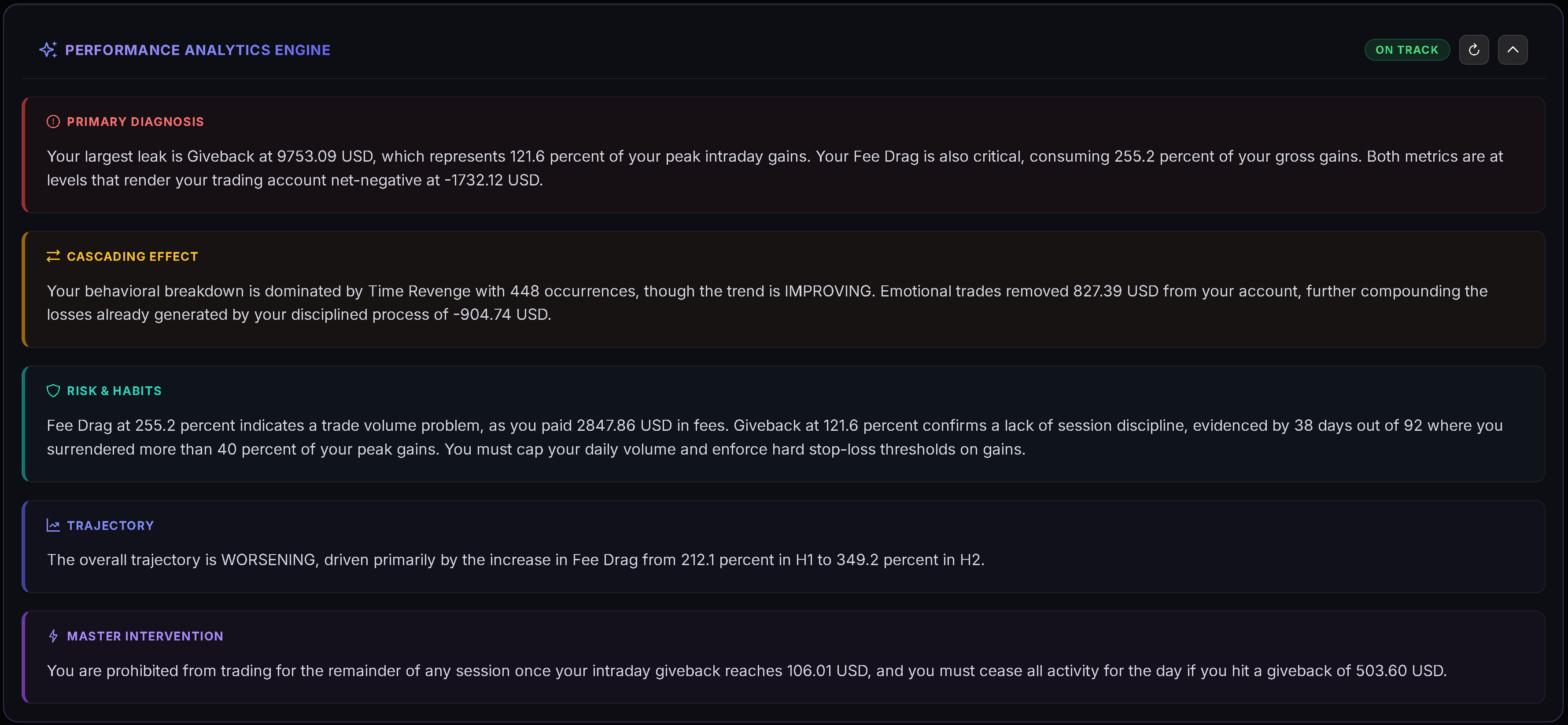
- Costo del tilt - il divario tra il P&L disciplinato e il P&L effettivo in presenza di tag comportamentali.
- Riepilogo comportamentale - la perdita psicologica principale e la frequenza dei tag correlati.
Le schede sono ordinate per gravità e punteggio. Le metriche nella norma rimangono nascoste e viene mostrato uno stato di conformità ottimale quando non sono presenti criticità.
Analitica (Analytics)
Analitica raggruppa analisi più approfondite in quattro schede: Playbook, Tag, Qualità e Disciplina. Il browser memorizza la scheda analitica attiva per la visita successiva.
Consulta Analitica della Dashboard per una panoramica completa di ciò che ciascuna scheda esamina e di quando vengono visualizzati i grafici.
Personalizzata
Personalizzata è un layout modulare Gridster in cui puoi disporre i tuoi widget. Clicca su Modifica layout per accedere alla modalità di modifica, quindi aggiungi, rimuovi, sposta o ridimensiona i widget. Clicca su Fine per salvare il layout.
La Dashboard memorizza la tua disposizione personalizzata e mantiene aggiornato il set di widget disponibili.
Widget personalizzati
I widget disponibili includono:
- Decision Verdict.
- Edge Decomposition.
- Tomorrow Plan.
- Risk Integrity.
- Discipline Radar.
- Regime & Context.
- Grafico P&L cumulativo.
- Prestazioni per mese.
- Analisi tempo di detenzione.
- Guadagno medio vs Perdita media.
- Massimo guadagno / Massima perdita.
- P&L per orario della giornata.
- Perdite comportamentali.
- Analisi impatto commissioni.
Alcuni widget compaiono solo quando il periodo selezionato dispone di un numero sufficiente di dati per rendere l’analisi significativa.
Report di periodo (algoritmico)
Il report di periodo si trova nella parte superiore della Dashboard, sopra le schede General / Weaknesses / Analytics, e viene mostrato su tutte e tre. Quando è selezionato 1M, 3M o 1Y, il report esamina l’ultimo mese, trimestre o anno solare completato (non viene visualizzato per un intervallo di date personalizzato). Un pulsante nella barra degli strumenti (ad esempio “2025 report”, “Q3 2026 report”) consente di mostrarlo o nasconderlo.
Il report di periodo è calcolato in modo puramente deterministico dal codice di Trandence, senza alcuna intelligenza artificiale, e include:
- una linea di verdetto;
- “Where the money went” (Dove sono finiti i soldi): fino a tre perdite principali, ordinate per impatto in dollari (commissioni, una mezz’ora costosa, un giorno della settimana peggiore della media, rientri entro 5 minuti da una perdita, trading dopo 3 perdite consecutive, giorni di overtrading, superamento dello stop giornaliero, giorni con perdite sproporzionate, giveback, un playbook perdente);
- “What works” (Cosa funziona): fino a due punti di forza accertati;
- “Rules for next period” (Regole per il prossimo periodo): due regole derivate direttamente dai tuoi numeri;
- note di contesto se il campione è limitato o se poche operazioni hanno un playbook assegnato.
Ciascuna evidenza richiede almeno 5 trade per essere generata.
Copy prompt for AI
Il pulsante “Copy prompt for AI” nell’intestazione del report di periodo copia un prompt pronto all’uso con i tuoi numeri, da incollare nell’assistente IA di tua scelta (Claude, ChatGPT, Gemini o qualsiasi altro). Trandence crea il prompt sul proprio server dal tuo diario e lo passa al browser per copiarlo; non lo invia mai a un fornitore di IA — decidi tu dove incollarlo. Se il browser blocca gli appunti, il prompt viene aperto in una finestra di dialogo per essere copiato manualmente.
Articoli correlati
- Analitica della Dashboard
- Dashboard Decision Engine
- Statistiche di periodo del calendario
- Piani giornalieri
- Revisioni dei simboli
- Playbook
Serve aiuto?
Se i numeri della Dashboard non corrispondono al periodo previsto, verifica l’intervallo di date attivo, la modalità P&L e se le transazioni pertinenti sono state importate per quel periodo. Per assistenza, scrivi a [email protected].
Serve aiuto?
Domande su Dashboard? Rispondiamo entro un giorno lavorativo.