
Dashboard
O Dashboard é o centro de comando do seu desempenho operacional. Ele combina KPIs em nível de período, visualizações analíticas fixas, detecção de vazamentos de capital (leaks), seções de análise aprofundada, um relatório de período algorítmico com prompts de IA prontos para cópia e um layout de widgets personalizável.
Controles de período
A análise do Dashboard é delimitada pelo período ativo. Use os controles no cabeçalho para alternar entre:
- 1M - último mês.
- 3M - últimos três meses.
- 1Y - últimos doze meses.
- Personalizado - um intervalo de datas selecionado manualmente.
O navegador memoriza a predefinição selecionada, de modo que atualizar a página restaura o mesmo período. Quando você escolhe um intervalo personalizado, a barra de KPIs, os widgets, a detecção de fraquezas e as análises recarregam com base nas mesmas datas.
Barra de KPIs
A barra de KPIs fixa permanece no topo do Dashboard e resume o período ativo. Ela utiliza os mesmos dados de operações e modo de P&L do restante da página, portanto, alterar o período ou alternar entre P&L bruto/líquido afeta todo o Dashboard de maneira consistente.
Visualizações do Dashboard
O Dashboard possui quatro visualizações principais. O navegador lembra a visualização ativa para a próxima visita.
Geral
Geral exibe os principais gráficos de desempenho:
- Curva de equity.
- Desempenho por dia da semana.
- Desempenho por hora do dia.
Use essa visualização para obter uma leitura rápida sobre a evolução dos retornos e onde seus ganhos se concentram.
Fraquezas (Weaknesses)
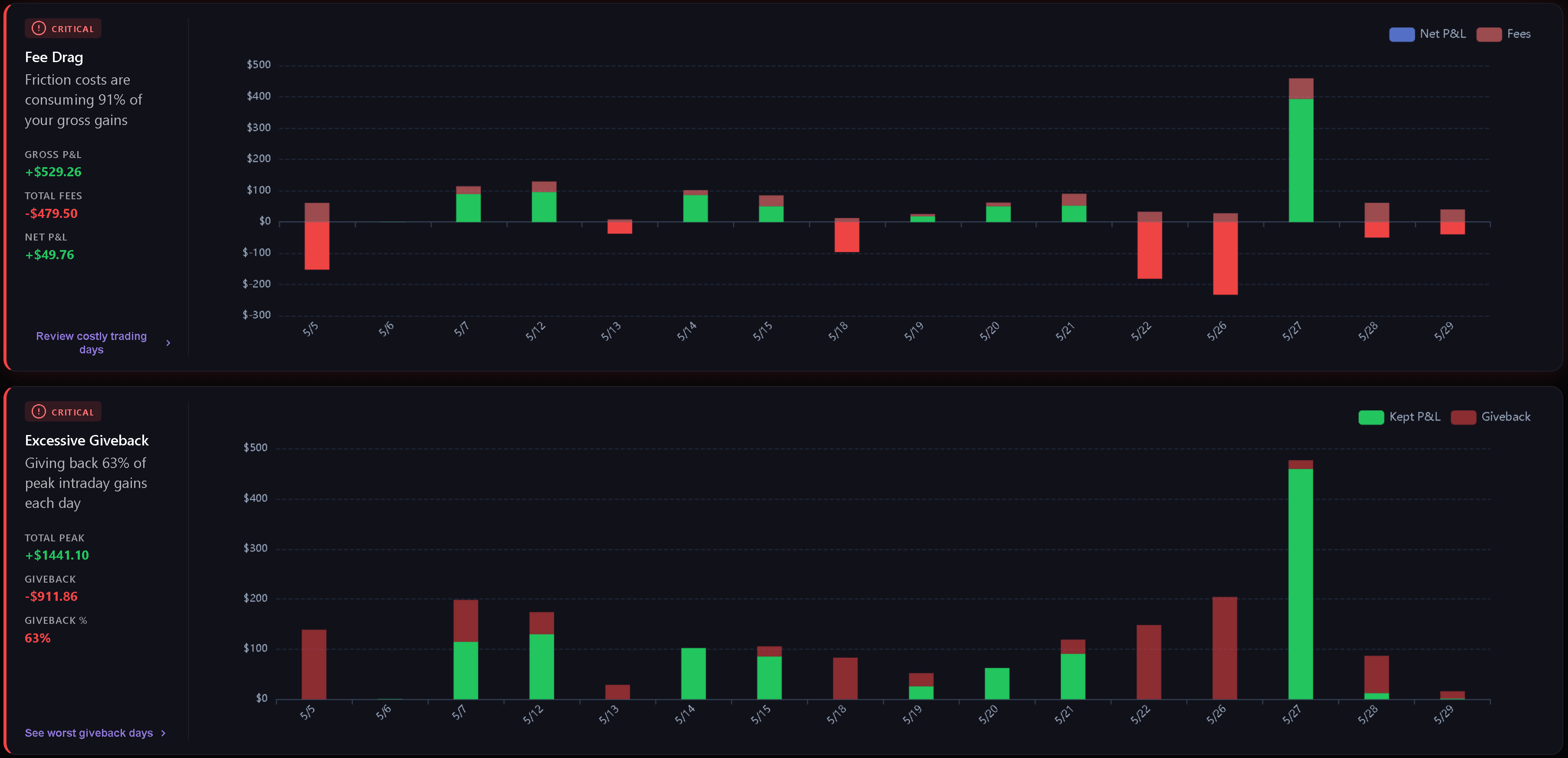
A aba Fraquezas detecta e classifica os vazamentos mais críticos no período selecionado, a partir das suas próprias operações.
As categorias atuais incluem:
- Arrasto de taxas (Fee Drag) - o quanto comissões e taxas consom dos seus ganhos brutos.
- Devolução excessiva (Excessive Giveback) - o quanto do lucro máximo intraday é devolvido antes do fechamento.
- Assimetria no tempo de retenção - se as operações perdedoras são mantidas por muito mais tempo do que as vencedoras.
- Overtrading - com que frequência o número diário de operações excede o limite configurado.
- Custo do tilt - a diferença entre o P&L disciplinado e o P&L real quando tags comportamentais estão presentes.
- Resumo comportamental - o principal padrão psicológico e a frequência das tags relacionadas.
Os cartões são ordenados primeiro pela gravidade e depois pela pontuação. Métricas dentro do esperado permanecem ocultas, e um aviso de conformidade total é exibido quando não há problemas críticos.
Análise (Analytics)
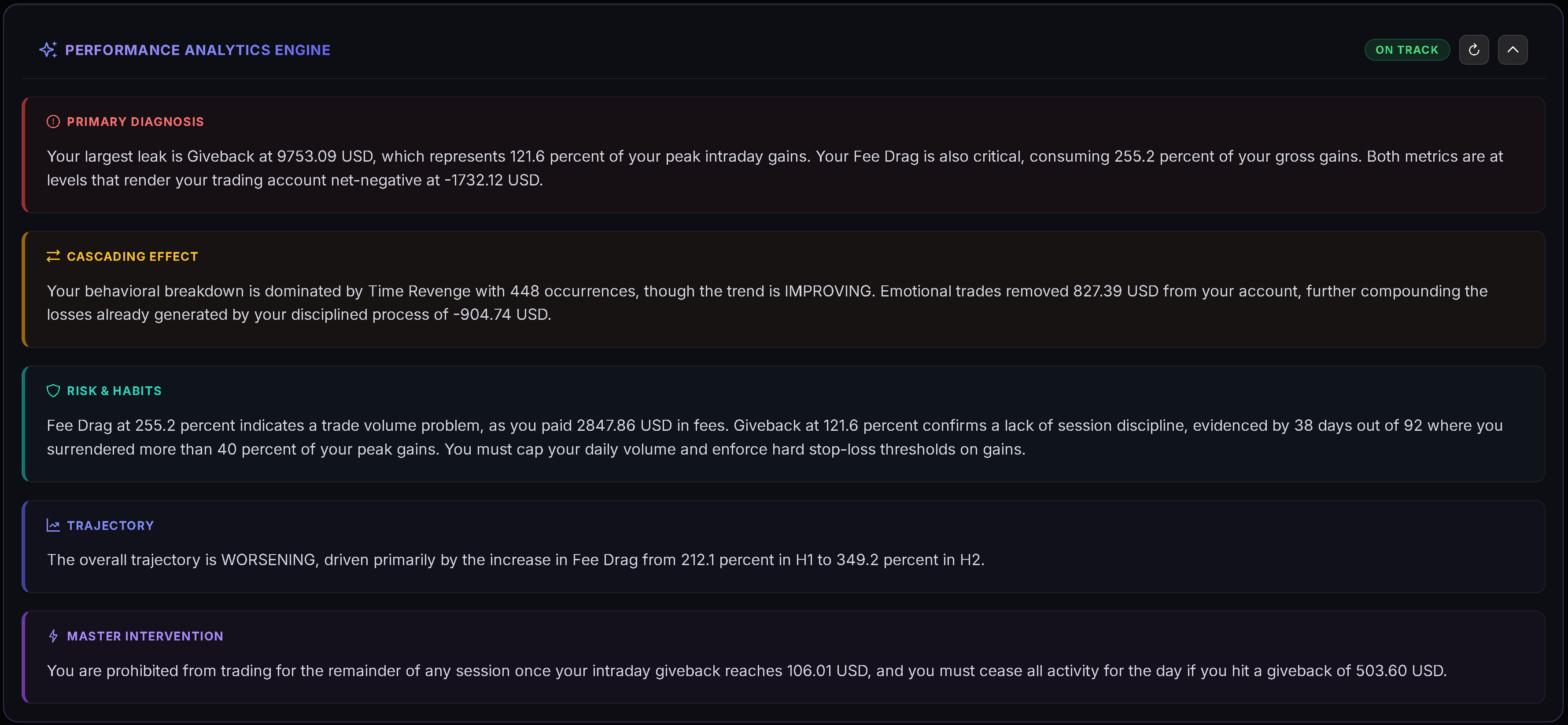
A seção Análise reúne detalhamentos aprofundados em quatro abas: Playbooks, Tags, Qualidade e Disciplina. O navegador lembra a aba analítica ativa para a próxima visita.
Consulte Análise do Dashboard para obter o detalhamento completo de cada métrica e quando os gráficos são exibidos.
Personalizado
Personalizado é um layout modular Gridster onde você pode organizar seus próprios widgets. Clique em Editar layout para entrar no modo de edição e adicione, remova, mova ou redimensione os widgets. Clique em Concluído para salvar o layout.
O Dashboard memoriza sua disposição personalizada e mantém os widgets disponíveis atualizados ao longo do tempo.
Widgets personalizados
Os widgets disponíveis incluem:
- Decision Verdict.
- Edge Decomposition.
- Tomorrow Plan.
- Risk Integrity.
- Discipline Radar.
- Regime & Context.
- Gráfico de P&L acumulado.
- Desempenho por mês.
- Análise de tempo de retenção.
- Ganho médio vs Perda média.
- Maior ganho / Maior perda.
- P&L por hora do dia.
- Vazamentos comportamentais.
- Análise de arrasto de taxas.
Alguns widgets aparecem apenas quando o período selecionado possui dados suficientes para tornar a visualização relevante.
Relatório de período (algorítmico)
O relatório de período fica no topo do Dashboard, acima das abas General / Weaknesses / Analytics, e é exibido em todas as três. Quando 1M, 3M ou 1Y estiver selecionado, ele cobre o último mês, trimestre ou ano civil concluído (não aparece para um intervalo de datas personalizado). Um botão na barra de ferramentas (por exemplo, “2025 report” ou “Q3 2026 report”) exibe ou oculta o relatório.
O relatório de período é calculado de forma determinística pelo próprio código do Trandence, sem inteligência artificial, e contém:
- uma linha de veredito;
- “Where the money went” (Onde o dinheiro foi): até três vazamentos principais ordenados pelo impacto financeiro (taxas, meia hora dispendiosa, dia da semana com desempenho pior que a média, reentradas em até 5 minutos após perda, operar após 3 perdas consecutivas, dias de overtrading, ultrapassar o stop diário, dias de perda desproporcional, devolução de lucro, playbook perdedor);
- “What works” (O que funciona): até dois pontos fortes comprovados;
- “Rules for next period” (Regras para o próximo período): duas regras criadas diretamente a partir dos seus números;
- notas de contexto quando o tamanho da amostra é pequeno ou poucas operações possuem um playbook associado.
Cada apontamento requer pelo menos 5 operações para garantir relevância estatística.
Copy prompt for AI
O botão “Copy prompt for AI” no cabeçalho do relatório de período copia um prompt pronto com seus números exatos para você colar no assistente de IA da sua escolha (Claude, ChatGPT, Gemini ou qualquer outro). O Trandence monta o prompt em seu próprio servidor a partir do seu diário e o entrega ao seu navegador para cópia; ele nunca é enviado a um provedor de IA — você decide onde colar. Se o navegador bloquear o acesso à área de transferência, o prompt será aberto em uma janela para cópia manual.
Artigos relacionados
- Análise do Dashboard
- Dashboard Decision Engine
- Estatísticas de período do calendário
- Planos diários
- Revisões de símbolos
- Playbooks
Precisa de ajuda?
Se os números do Dashboard não corresponderem ao período esperado, verifique o intervalo de datas ativo, o modo de P&L e se as operações relevantes foram importadas para aquele período. Para obter ajuda, contate [email protected].
Precisa de ajuda?
Dúvidas sobre Dashboard? Respondemos em até um dia útil.