
Dashboard
Dashboard es el centro de mando de tu rendimiento operativo. Combina métricas a nivel de período, vistas de análisis fijas, detección de debilidades, pestañas analíticas, un informe algorítmico de período con prompts de IA listos para copiar y un diseño de widgets personalizable.
Period Controls
Dashboard analysis is scoped by el active periodo. Use el header controls to switch between:
- 1M - last one month.
- 3M - last three months.
- 1Y - last twelve months.
- Custom - a manually seleccionado date range.
The browser remembers el seleccionado preset, so refreshing el página restores el same periodo. When you choose a custom range, el KPI bar, widgets, weakness insights, y analytics all reload against el same dates.
KPI Bar
The fixed KPI bar stays at el top of Dashboard y summarizes el active periodo. It uses el same trade datos y P&L mode as el rest of el página, so changing periodo or switching gross/net P&L affects el entire Dashboard consistently.
Dashboard Views
Dashboard has four views. The browser remembers el active view for el next visit.
General
General muestra el primary performance charts:
- Equity curve.
- Day-of-week performance.
- Time-of-day performance.
Use it for a fast read on whether performance is improving y where returns cluster.
Weaknesses
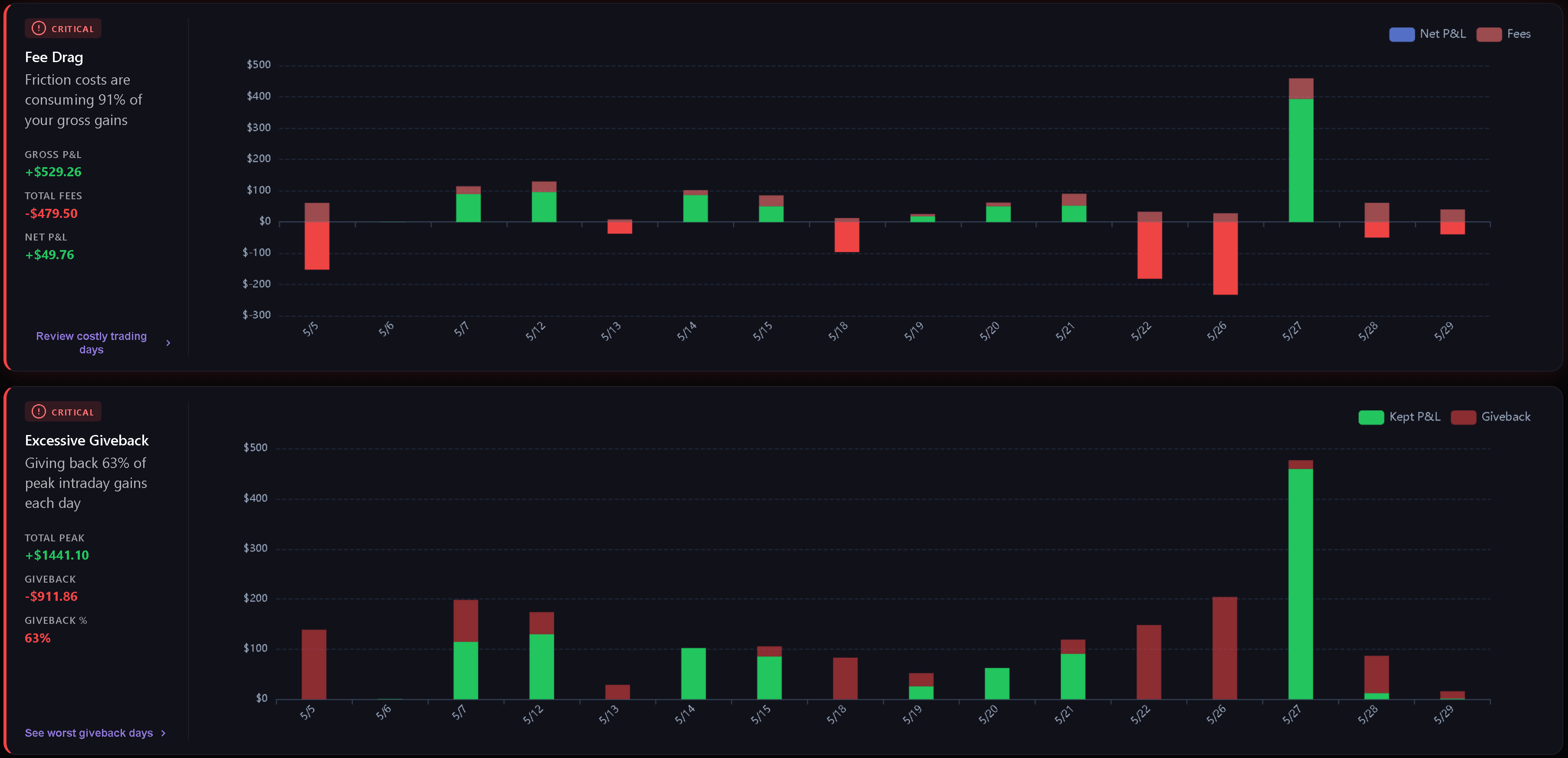
Weaknesses detecta y ordena las fugas más importantes del periodo seleccionado a partir de tus propias operaciones.
Current weakness categories include:
- Fee Drag - how much commissions y fees consume gross gains.
- Excessive Giveback - how much peak intraday profit is lost antes el close.
- Hold Time Asymmetry - whether losing trades are held much longer than winning trades.
- Overtrading - how often daily trade count exceeds el configured threshold.
- Cost of Tilt - el gap between disciplined P&L y actual P&L when behavioral tags are present.
- Behavioral Summary - el top psychological leak y related tag frequency.
Cards are sorted by severity first, then score. Normal metric cards are hidden, y an all-clear state appears when there are trades but no critical or warning metric weaknesses.
Analytics
Analytics groups deeper breakdowns into four pills: Playbooks, Tags, Quality, y Discipline. The browser remembers el active analytics pill for el next visit.
See Dashboard Analytics for el full breakdown of what each pill reads y when charts appear.
Custom
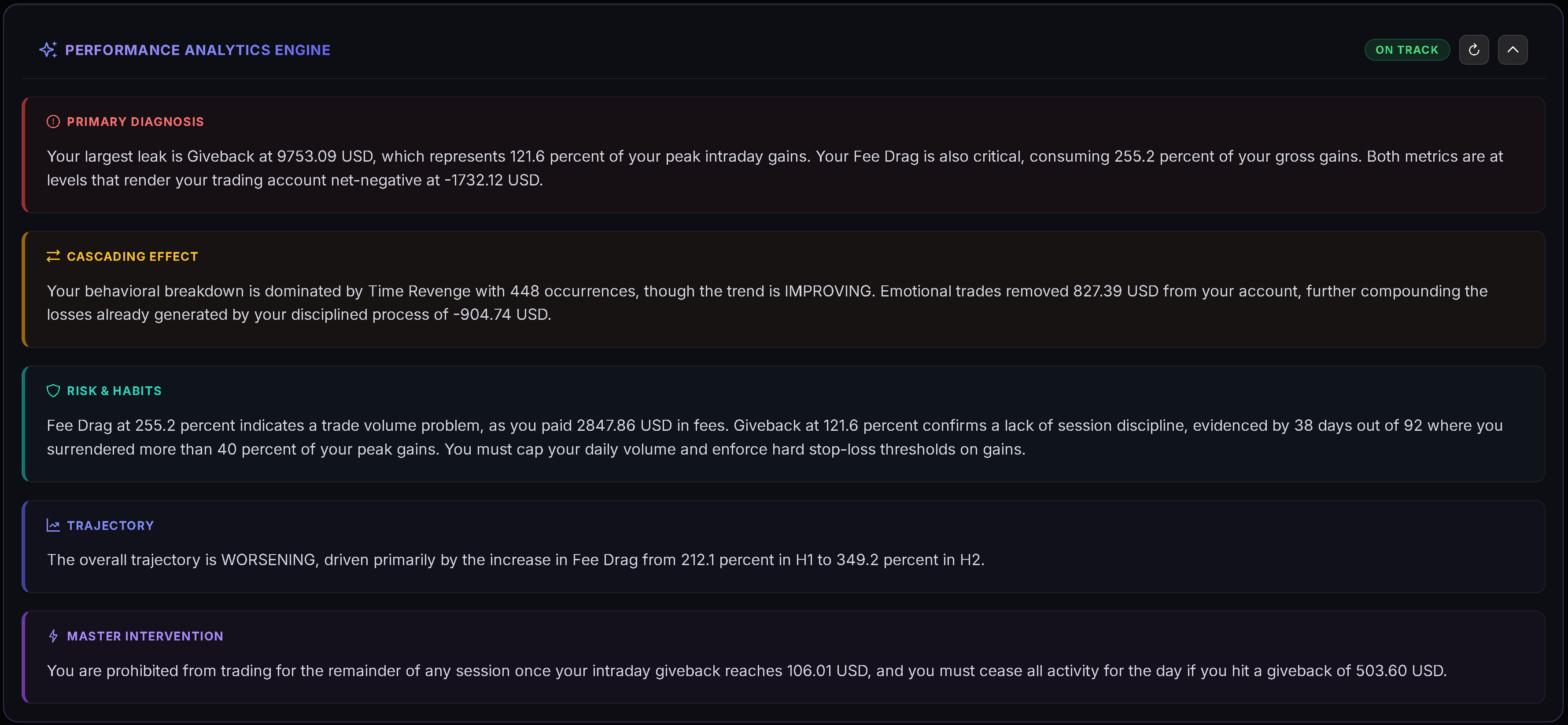
Custom is a Gridster layout where you can arrange your own widgets. Haga clic en Edit Layout to enter edit mode, then add, remove, move, or resize widgets. Haga clic en Done to save el layout.
Dashboard remembers your custom layout y keeps el disponibles widget set actual over time.
Custom Widgets
Available widgets include:
- Decision Verdict.
- Edge Decomposition.
- Tomorrow Plan.
- Risk Integrity.
- Discipline Radar.
- Regime & Context.
- Cumulative P&L Chart.
- Performance by Month.
- Hold Time Analysis.
- Avg Win vs Loss.
- Largest Gain/Loss.
- Time of Day P&L.
- Behavioral Leaks.
- Fee Drag Analysis.
Some widgets appear only when el seleccionado periodo has enough datos to make el view useful.
Informe de período (algorítmico)
El informe de período se encuentra en la parte superior del Dashboard, por encima de las pestañas General / Weaknesses / Analytics, y se muestra en las tres. Cuando se selecciona 1M, 3M o 1Y, cubre el último mes, trimestre o año completado (no aparece para un rango de fechas personalizado). Un botón de la barra de herramientas (por ejemplo, “2025 report” o “Q3 2026 report”) permite mostrarlo u ocultarlo.
El informe de período se calcula de forma determinista mediante el código propio de Trandence sin IA y contiene:
- una línea de veredicto;
- “Where the money went”: hasta tres fugas críticas, ordenadas por su impacto en dólares (comisiones, una media hora costosa, un día de la semana con peor rendimiento por operación que la media, entradas de revancha en los 5 minutos posteriores a una pérdida, operar tras 3 pérdidas consecutivas, días de sobreoperación, superación del límite diario de pérdidas, días con pérdidas desproporcionadas, giveback, un playbook perdedor);
- “What works”: hasta dos fortalezas comprobadas;
- “Rules for next period”: dos reglas generadas directamente a partir de tus propios números;
- notas cuando la muestra es reducida o pocas operaciones tienen un playbook asignado.
Cada hallazgo requiere al menos 5 operaciones.
Copy prompt for AI
El botón “Copy prompt for AI” en el encabezado del informe de período copia un prompt estructurado con tus números calculados para que puedas pegarlo en cualquier asistente de IA que elijas (Claude, ChatGPT, Gemini o cualquier otro). Trandence genera el prompt en su propio servidor a partir de tu diario y se lo entrega a tu navegador para que lo copies; nunca lo envía a ningún proveedor de IA: tú decides dónde pegarlo. Si el navegador bloquea el portapapeles, el prompt se abre en una ventana para copiarlo manualmente.
Artículos relacionados
- Dashboard Analytics
- Dashboard Decision Engine
- Calendar Period Insights
- Daily Plans
- Symbol Reviews
- Playbooks
¿Necesita ayuda?
Si Dashboard numbers do not match el periodo you expect, check el active date range, P&L mode, y whether el relevant trades are importacióned for that periodo. Para ayuda, contacte [email protected].
¿Necesitas ayuda?
¿Preguntas sobre Dashboard? Respondemos en un día hábil.