
Symbol Reviews
Symbol Rivedis let you review execution one symbol at a time. They are il bridge between raw trades e a useful post-market lesson: what was planned, what happened on il chart, what mistakes showed up, e what dovrebbe change next time.
Symbol Rivedis List
Open Journal > Symbol Reviews to see saved symbol journals. The tabella supporta:
- Date sorting.
- Symbol filtering.
- Grade sorting.
- Completion filtering.
- Pagination.
- Direct open action.
Rivedis appear dopo you fill them from il Calendar Symbol Report flow or open a symbol report for a traded symbol.
Queue Workflow
When you review a trading day with multiple symbols, Trandence loads a queue. The header mostra il attuale queue position, such as Symbol 2 of 5.
Usa:
- Save to save il attuale symbol without moving.
- Save & Next Symbol to save e continue through il queue.
- Save & Go to Calendar when il queue is finished from a Calendar entry point.
Questo aiuta you complete a full day without losing your place.
Trade Hero And Executions
The Symbol Report starts with il symbol’s campaign-level trade strip. It can include multiple trades e individual executions for il selezionato symbol/date.
Usa il executions drawer to inspect:
- Execution time.
- Side.
- Quantity.
- Price.
- Per-execution P&L where disponibili.
Fundamentals
The Fundamentals drawer can show e edit symbol context such as sector, industry, market cap, shares outstanding, average volume, short float, ATR, RVOL, gap, e pre-market volume metrics where disponibili.
Usa fundamentals to separate execution mistakes from context problems. Un trade in a thin, high-spread name deserves a different review than a liquid symbol with clean structure.
Charts And Drawing Tools
Symbol Report includes chart review tools:
- Price action chart.
- P&L chart.
- Behavioral tag overlay.
- Quant level overlay.
- Drawing tools for lines, trend lines, arrows, e text notes.
- Salvad chart lines.
- Full-screen chart view.
- Snapshot/export actions.
Saving chart lines keeps your visual reconstruction disponibili for later review.
Execution Analysis
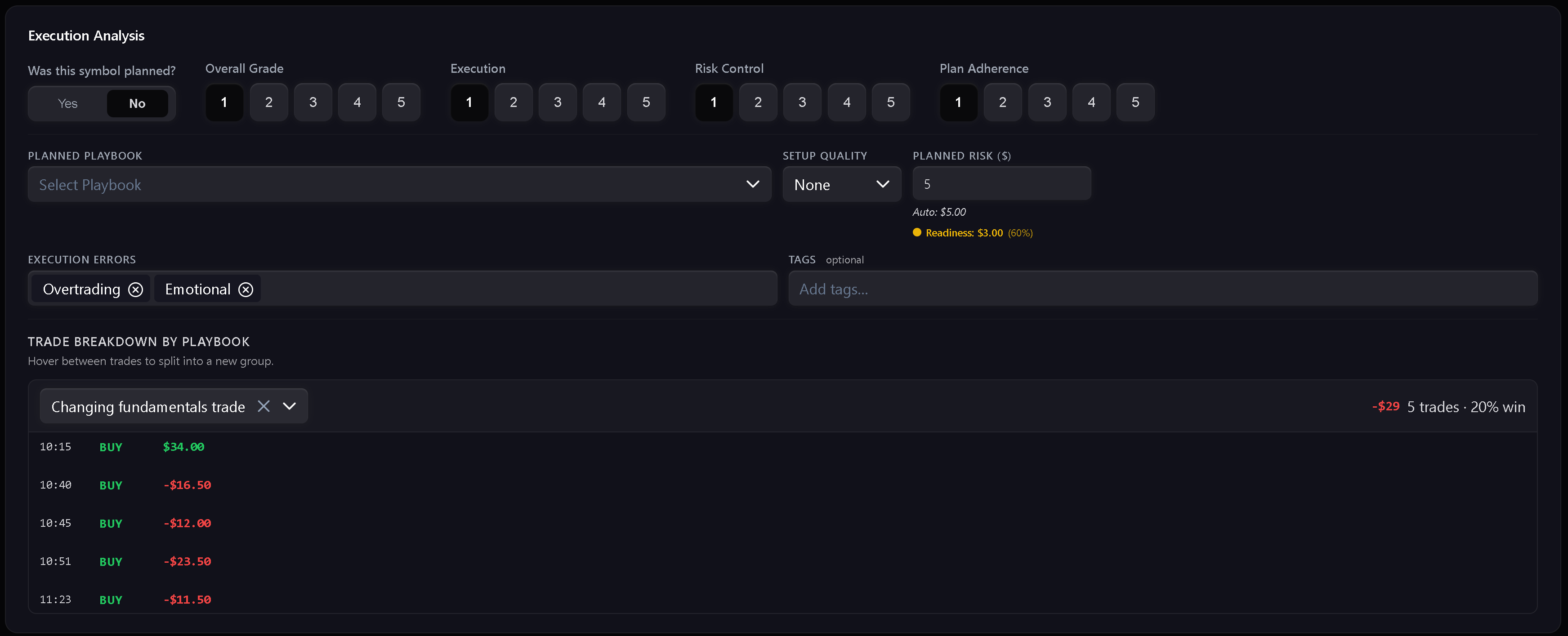
The main review card captures execution quality:
- Grade.
- Execution score.
- Risk control score.
- Plan adherence score.
- Planned playbook.
- Impostaup quality.
- Planned rischio amount.
- Execution errors.
- Tags.
- Trade breakdown by playbook.
- Reflection.
Se il symbol was on il pre-market watchlist, Trandence can bridge relevant playbook e setup context into il Symbol Report.
Playbooks, Risk, And Readiness
Symbol Report can auto-calculate planned rischio from your rischio profile e readiness context. Se il auto value is not correct for il trade, you can override planned rischio manually e reset it later.
When playbook adherence is low, Trandence can warn that il trade may not be a clean sample of that setup even if it sarà still be logged for behavioral analysis.
Suggestions
Tag e mistake fields support suggestions. I suggerimenti aiutano standardizzare your vocabolario so later analytics can group repeated issues instead of treating every phrase as a separati errore.
Puoi remove unwanted suggestions when they are no longer useful.
Export
Symbol Report can render a tear-sheet style export. Usa it when you want to archive a trade review, share it with a coach, or keep a visual record of il setup e execution.
Serve aiuto?
Se a symbol is missing from il queue, confirm il trades exist for il selezionato date e timezone. Se chart or fundamentals dati does not load, retry il drawer or contact [email protected].
Serve aiuto?
Domande su Symbol Reviews? Rispondiamo entro un giorno lavorativo.