
Tag Comportamentali
I tag comportamentali (Behavioral Tags) sono le etichette automatiche di Trandence ideate per individuare pattern operativi ad alto rischio emotivo. Aiutano a rilevare con chiarezza quando la condotta di trading è mutata in seguito a perdite, vincite consecutive, fasi di drawdown o sotto la pressione di ripetuti rientri a mercato.
Questi tag operano in modo completamente indipendente rispetto alle etichette manuali. I tag manuali vengono creati e modificati direttamente dall’utente; i tag comportamentali vengono generati dal motore comportamentale sulla base della sequenza degli ordini eseguiti e della configurazione attiva.
Dove Compaiono i Tag Comportamentali
I segnali comportamentali sono integrati trasversalmente nella piattaforma:
- Trades (Operazioni): Badge posizionati accanto ai ticker nella tabella principale delle operazioni.
- Calendar (Calendario): Indicatori grafici all’interno delle righe espanse per giornata o per singolo titolo.
- Charts (Grafici): Marcatori a forma di rombo violetto sui grafici di prezzo e di P&L, con dettagli consultabili tramite descrizioni a comparsa (tooltip) o etichette informative.
- Dashboard Weaknesses (Punti Deboli nella Dashboard): Riquadri analitici dedicati come Cost of Tilt (Costo del Tilt), Behavioral Summary (Riepilogo Comportamentale) e schede di dispersione del capitale (leak cards).
- Calendar Period Insights (Analisi Periodiche del Calendario): Frequenza dei pattern, costo cumulativo del tilt e diagnosi contestuali del periodo selezionato.
- Symbol Reports (Report per Singolo Titolo): Tag comportamentali e contesto degli errori a supporto dell’analisi approfondita per singolo asset.
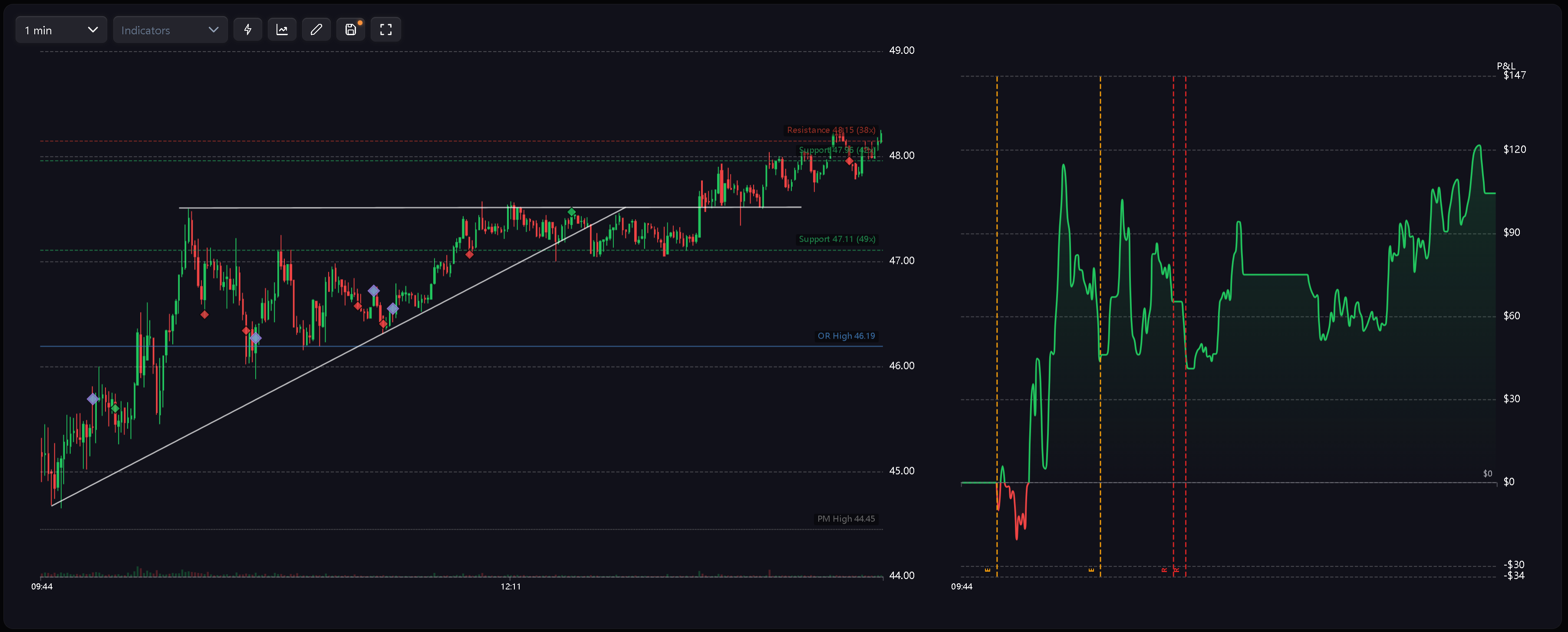
Codici dei Tag
I tag comportamentali utilizzano etichette sintetiche per garantire massima leggibilità sia nelle tabelle che sui grafici:
- R — Revenge (Vendetta): Nuova operazione aperta a brevissima distanza dalla chiusura di un trade in perdita.
- RS — Revenge Sizing (Size di Rivalsa): Operazione successiva a una perdita eseguita con dimensioni vistosamente sproporzionate.
- D — Desperation Entry (Ingresso per Disperazione): Trade aperto a ridosso di una serie di perdite consecutive.
- E — Euphoria (Euforia): Operazione inserita subito dopo una sequenza continuativa di vincite.
- CA — Catastrophic Averaging (Media al Ribasso Catastrofica): Il trader incrementa l’esposizione su una posizione in perdita mentre il drawdown è già critico rispetto al limite di perdita giornaliero (daily stop loss).
Sui grafici viene impiegato un rombo violetto unificato per distinguere visivamente le anomalie comportamentali dai classici marcatori di esecuzione verdi e rossi. L’identità specifica dell’evento viene indicata dal codice o visualizzata nel tooltip.
Avvisi di Sessione e Multi-Day
Il sistema comportamentale elabora inoltre avvisi di livello superiore orientati alla gestione complessiva del rischio:
- Tilt Zone Approached (Zona Tilt Imminente): L’operatività prosegue nonostante il risultato della seduta si sia avvicinato pericolosamente al limite di rischio massimo.
- Excessive Fee Drag (Incidenza Commissionale Eccessiva): Il peso complessivo di commissioni e imposte raggiunge livelli tali da distorcere l’esito netto della sessione.
- Risk Downgrade Required (Riduzione del Rischio Richiesta): Il superamento reiterato del daily stop loss su più sedute evidenzia la necessità di ridurre sistematicamente l’esposizione per singolo trade.
Questi avvisi alimentano i report periodici, l’analisi delle inefficienze e i flussi di revisione metodologica, anziché limitarsi a etichettare singoli eseguiti.
Come Vengono Calcolati i Tag
I tag comportamentali scaturiscono dall’analisi cronologica degli eseguiti, dal contesto della curva P&L, dalle variazioni di dimensionamento (sizing), dalla categoria operativa e dai parametri di rischio giornaliero.
Regole operative fondamentali:
- Ordine cronologico: I trade chiusi vengono valutati rigorosamente in ordine di esecuzione temporale.
- Segmentazione operativa: Le regole possono essere circoscritte in modo indipendente a operazioni Intraday, Swing o Position.
- Controllo generale: L’interruttore principale di configurazione consente di disabilitare l’intero rilevamento comportamentale in qualsiasi momento.
- Denominazioni riservate: I nomi dei tag comportamentali sono riservati dal sistema e non devono essere impiegati per creare etichette manuali personalizzate.
Poiché l’attribuzione dipende dalla sequenza temporale complessiva, la modifica o l’eliminazione di un trade antecedente può ricalcolare e alterare i tag assegnati ai trade successivi.
Aggiornamenti Reattivi
I tag comportamentali sono progettati per aggiornarsi e sincronizzarsi automaticamente al variare dei dati di base:
- Importazione: L’importazione di nuovi trade applica i badge corrispondenti senza richiedere alcuna riassegnazione manuale.
- Modifica: Trasformare un trade in perdita in un’operazione in guadagno può spezzare una sequenza negativa ed eliminare i badge generati successivamente.
- Cancellazione: Eliminare un trade antecedente rimodula l’ordine temporale e adegua i tag sequenziali a valle.
- Riconfigurazione: L’aggiornamento dei parametri comportamentali allinea istantaneamente Calendar, Trades, grafici, Dashboard e analisi di periodo in base alle nuove regole operative.
Configurazione del Rilevamento
Accedi a Settings > Behavior Config per calibrare le soglie operative del motore. È possibile selezionare profili preimpostati (presets), attivare o disattivare singoli controlli e stabilire se ciascuna regola debba monitorare strategie di tipo Intraday, Swing o Position.
Per la guida dettagliata alla configurazione, consulta Impostazioni Comportamentali.
Articoli Correlati
- Impostazioni Comportamentali
- Rilevamento del Tilt
- L’Effetto Euforia
- Dashboard
- Analisi Periodiche del Calendario
Hai bisogno di aiuto?
Se un badge comportamentale sembra inatteso, verifica innanzitutto la cronologia temporale dell’operazione, il P&L, il profilo comportamentale (preset) selezionato, le regole attive e i filtri di categoria operativa (Intraday, Swing o Position). Per ulteriore assistenza, contattaci all’indirizzo [email protected].
Serve aiuto?
Domande su Tag Comportamentali? Rispondiamo entro un giorno lavorativo.