
Piani giornalieri
I Piani giornalieri combinano la preparazione pre-mercato e la revisione post-mercato per ciascuna giornata di trading. Sono progettati per proteggere il tuo capitale prima della sessione e rendere la tua analisi puntuale e rigorosa dopo la chiusura.
Elenco dei piani giornalieri
Apri Diario > Piani giornalieri per visualizzare la cronologia dei tuoi piani. L’elenco mostra:
- Data.
- Stato di completamento pre-mercato.
- Stato di completamento post-mercato.
- Voto della giornata.
- Obiettivo di focus.
- Data e ora dell’ultimo aggiornamento.
Usa Nuovo piano giornaliero per creare o aprire il piano della giornata corrente. Le righe esistenti aprono il piano completo per quella specifica data.
Modalità Pre-mercato
Il pre-mercato è la fase di preparazione fondamentale. Comprende la preparazione mentale, la definizione del rischio, la watchlist e il piano scritto della giornata.
Usala per registrare:
- Preparazione mentale.
- Preparazione fisica.
- Preparazione al contesto di mercato.
- Daily Stop Loss.
- Stop loss rettificato per la preparazione.
- Simboli della watchlist.
- Playbook previsti e livelli di qualità del setup.
- Livelli chiave di supporto e resistenza.
- Note operative e piani di trade per simbolo.
- Piano generale di mercato per la sessione.
Il punteggio di preparazione combina parametri mentali, fisici e di mercato. Se uno qualsiasi di questi fattori riceve un punteggio pari a 1, Trandence considera la giornata in zona rossa e sconsiglia l’operatività. Una preparazione più elevata consente di allocare una quota maggiore del Daily Stop Loss di base.
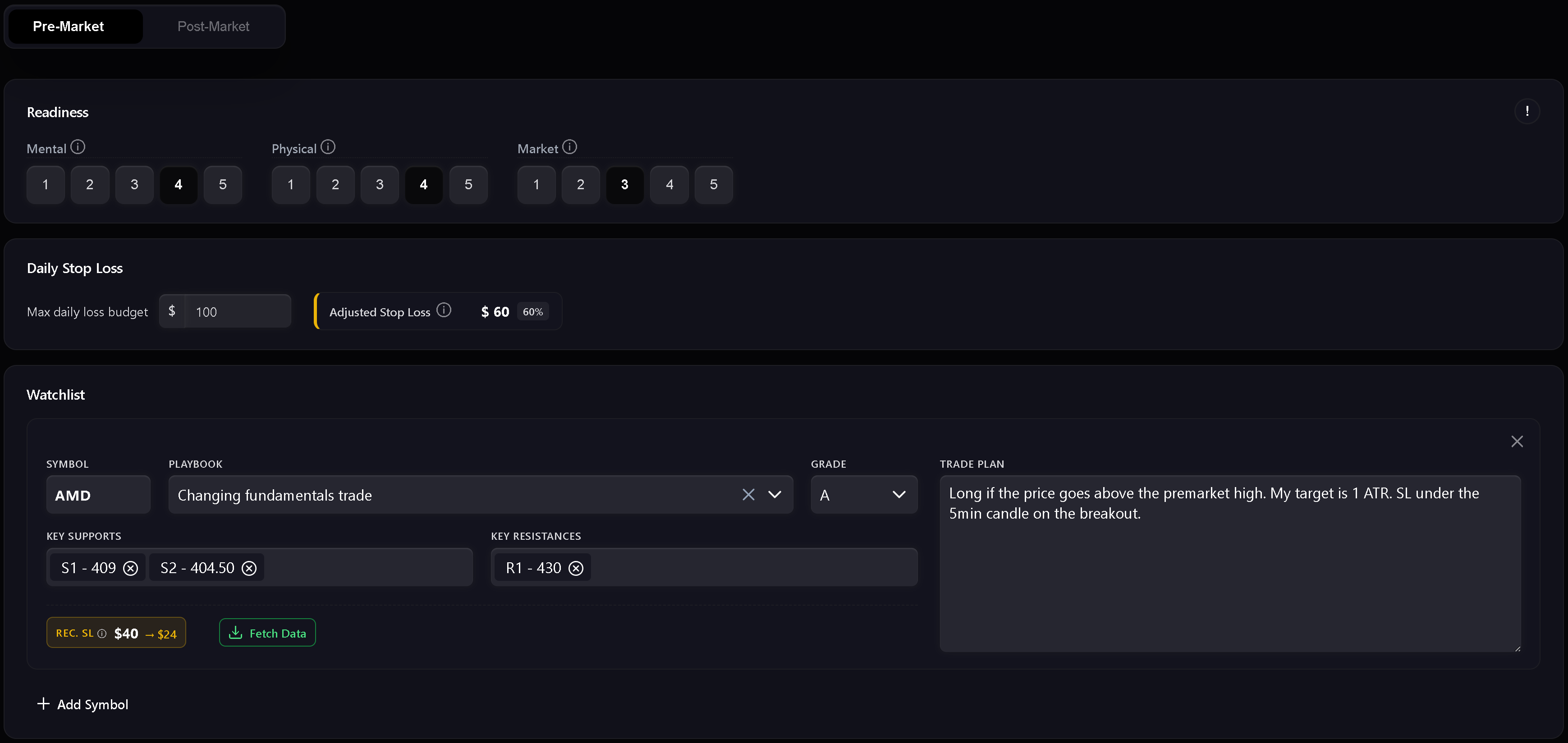
Watchlist
La watchlist è la sezione in cui prepari i piani operativi specifici per ciascun simbolo prima della sessione. Ciascuna riga può contenere simbolo, playbook, qualità prevista, livelli di supporto, livelli di resistenza e piano di trading. I livelli numerici vengono validati per rimanere utilizzabili nelle revisioni successive.
Obiettivo di focus dalla Dashboard
I moduli della Dashboard possono trasmettere un obiettivo di miglioramento direttamente nel Piano giornaliero. Quando la raccomandazione coincide con la data del piano, Trandence mostra un banner di focus e può precompilare il campo relativo. Le raccomandazioni sono vincolate alla data, ignorando elementi obsoleti.
Modalità Post-mercato
Il post-mercato si sblocca dopo aver completato e salvato il piano pre-mercato. È la fase di revisione e bilancio a fine giornata.
Usala per registrare:
- Voto della giornata.
- Qualità dell’esecuzione.
- Controllo del rischio.
- Rispetto del piano.
- Riflessione post-mercato.
- Note da portare alla sessione successiva.
I controlli rapidi non sono semplici annotazioni: alimentano le statistiche di periodo del calendario, la diagnostica della dashboard e il Risk Analyzer.
Completamento rigoroso del diario
Quando il diario rigoroso è attivato, Trandence richiede il completamento della checklist principale prima di considerare il diario ultimato. Se mancano campi obbligatori, le azioni di esportazione e i badge di completamento restano disabilitati, con un tooltip che specifica i dati mancanti.
I requisiti tipici includono:
- Sezione pre-mercato completata.
- Controlli rapidi post-mercato completati.
- Riflessione compilata con un testo significativo.
- Informazioni obbligatorie sul rischio inserite in base alla modalità di visualizzazione selezionata.
Ciò garantisce che il diario rifletta fedelmente il tuo processo di trading reale prima di alimentare le analisi della piattaforma.
Bozze, modifiche non salvate e stato del salvataggio
I Piani giornalieri tengono traccia delle modifiche non salvate per prevenire perdite accidentali di dati se esci dalla pagina. Il recupero delle bozze protegge inoltre il testo inserito in caso di chiusura imprevista della scheda.
L’indicatore di salvataggio mostra chiaramente gli stati di salvataggio in corso, salvato o errore.
Statistiche di periodo e prompt IA
Il completamento del piano giornaliero fornisce le basi di contesto per le analisi di Trandence:
- Report di periodo algoritmici : Integrano la disciplina della sessione, i punteggi di preparazione e il rispetto delle regole nella revisione periodica della dashboard.
- Prompt IA da copiare : Quando copi il prompt di un simbolo per analizzarlo con il tuo assistente IA personale, il piano pre-mercato, la preparazione e le autovalutazioni post-mercato vengono inclusi automaticamente.
- Connettore MCP : Gli assistenti esterni che interrogano il tuo diario tramite Model Context Protocol ricevono il contesto strutturato di piani e riflessioni.
Versione del Report di giornata nel Calendario
Lo stesso componente del Report di giornata è accessibile dal Calendario. In modalità Calendario, si concentra sull’analisi della data selezionata e permette azioni di download e condivisione quando il diario è completo.
Serve aiuto?
Se la sezione Post-mercato è bloccata, completa e salva prima la sezione Pre-mercato. Se le azioni di esportazione sono disabilitate, segui i suggerimenti nel tooltip o scrivi a [email protected].
Serve aiuto?
Domande su Piani giornalieri? Rispondiamo entro un giorno lavorativo.