
Daily Plans
Daily Plans combine pre-market preparation and post-market review for a single trading day. They are designed to protect your risk before the session and make your review specific after the session.
Daily Plans List
Open Journal > Daily Plans to see your plan history. The list shows:
- Date.
- Pre-market completion.
- Post-market completion.
- Day grade.
- Focus goal.
- Last updated time.
Use New Day Plan to create or open the current day’s plan. Existing rows open the full Daily Plan for that date.
Pre-Market Mode
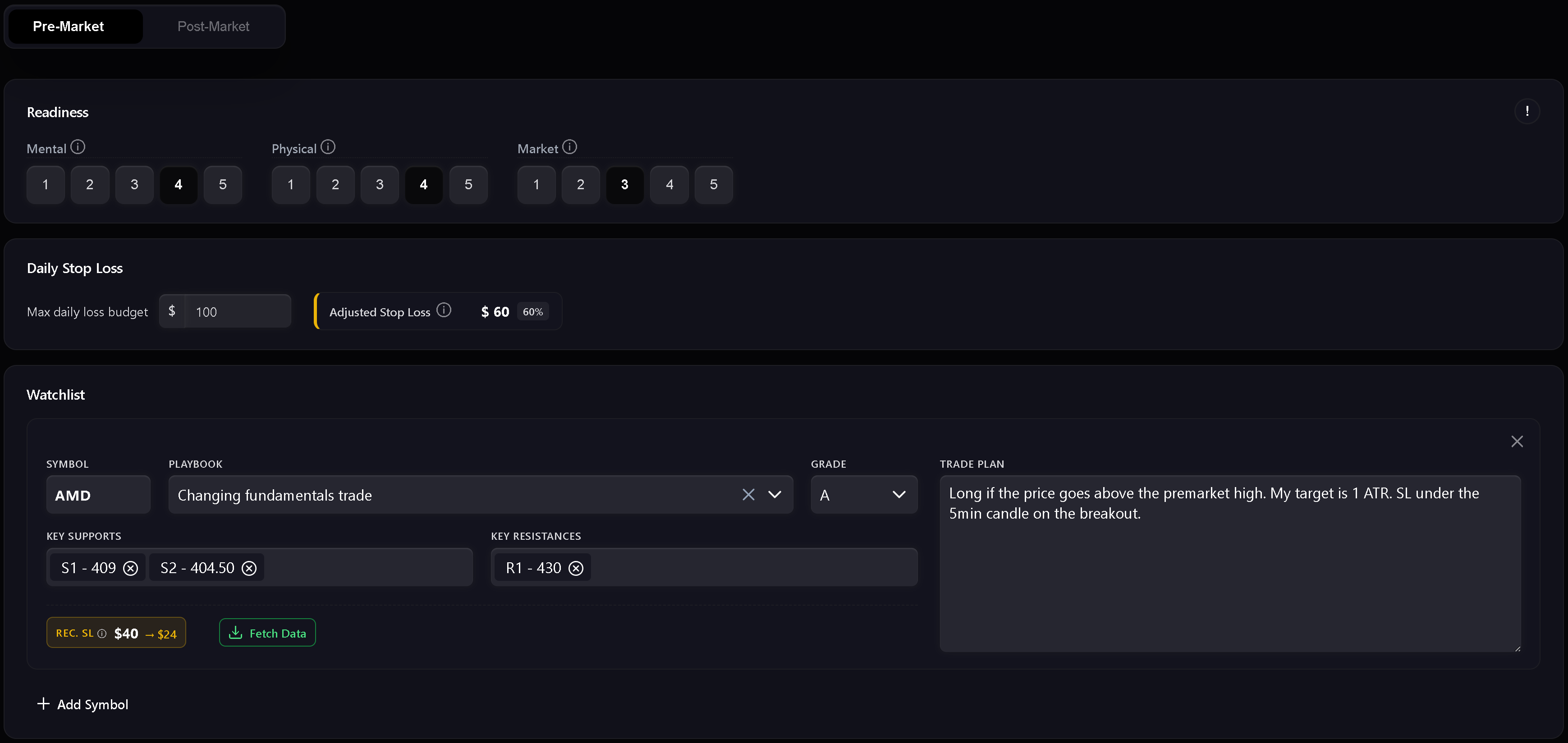
Pre-market is the preparation step. It includes readiness, risk, watchlist, and the written daily market plan.
Use it to record:
- Mental readiness.
- Physical readiness.
- Market readiness.
- Daily stop loss.
- Readiness-adjusted stop loss.
- Watchlist symbols.
- Planned playbooks and setup grades.
- Key support and resistance levels.
- Trade plan notes per symbol.
- Daily market plan.
The readiness score uses mental, physical, and market inputs. If any readiness dimension is scored at 1, Trandence treats the day as a red zone and trading is not recommended. Higher readiness allows a larger portion of the base daily stop loss.
Watchlist
The watchlist is where you prepare symbol-specific plans before trading. Each row can include a symbol, playbook, grade, support levels, resistance levels, and a trade plan. Numeric level chips are validated so support and resistance levels stay usable in later review.
Dashboard Focus Handoff
Dashboard modules can send a focus item into the Daily Plan. When the handoff matches the plan date, Trandence shows a focus banner and can prefill the focus field. Handoffs are date-scoped so stale focus items from another date are ignored.
Post-Market Mode
Post-market unlocks after the pre-market plan is complete. It is the day-level review step.
Use it to record:
- Day grade.
- Execution quality.
- Risk control.
- Plan adherence.
- Post-market reflection.
- Carry-forward context for the next session.
The quick checks are not just notes. They feed later Calendar period insights, Dashboard diagnostics, and Risk Analyzer context.
Strict Journaling Completion
When strict journaling is enabled, Trandence requires the core checklist before the journal is considered complete. If required fields are missing, export actions and completion badges remain disabled with a tooltip explaining what is missing.
Typical completion requirements include:
- Pre-market completed.
- Post-market quick checks completed.
- Reflection filled with meaningful content.
- Required risk information present when the selected risk display mode needs it.
This ensures your journal reflects your real trading process before feeding downstream analytics.
Drafts, Dirty State, And Save Status
Daily Plans track unsaved changes. If you edit a field and try to leave before saving, Trandence protects against silent data loss. Draft recovery also helps preserve pre-market text after a hard refresh or tab crash.
The save indicator shows when the plan is saving, saved, or failed.
Period Insights and AI Prompts
Completing your daily plan provides the contextual foundation for Trandence’s analytics:
- Algorithmic Period Reports: Feed session discipline, readiness scores, and rule adherence into the dashboard period review.
- AI Copy Prompts: When you copy a symbol prompt to analyze with your own AI assistant, your pre-market plan, readiness, and post-market self-grades are automatically included.
- MCP Connector: External assistants querying your journal over the Model Context Protocol receive structured plan and reflection context.
Calendar Version Of Day Report
The same Day Report component is also used from Calendar. In Calendar mode, it focuses on reviewing the selected date and can expose download/share actions when the journal is complete.
Need Help?
If Post-Market is locked, complete and save the Pre-Market section first. If export actions are disabled, follow the missing-item tooltip or contact [email protected].
Need Help?
Questions about Daily Plans? We answer within one business day.