
Плани на день (Daily Plans)
Daily Plans поєднує пре-маркет підготовку та пост-маркет аналіз торгової сесії в єдиному робочому просторі. Модуль розроблений для того, щоб захистити ваш капітал до початку торгівлі та забезпечити конкретний структурований розбір після закриття біржі.
Список планів
Відкрийте Journal > Daily Plans, щоб побачити хронологію ваших планів. Таблиця відображає:
- Дату торгової сесії.
- Статус заповнення Pre-market (підготовка).
- Статус заповнення Post-market (підсумки).
- Денну оцінку дисципліни (Day grade).
- Головну мету / фокус дня (Focus goal).
- Час останнього оновлення.
Кнопка New Day Plan відкриває форму для створення або редагування плану на сьогодні.
Режим Pre-Market (Підготовка до сесії)
Пре-маркет — це обов’язковий етап налаштування на роботу. Він включає оцінку готовності, ліміти ризику, ватчліст та загальний план на ринок.
Заповнюйте перед відкриттям торгів:
- Розумова готовність (Mental readiness): рівень концентрації та ясності мислення (від 1 до 5).
- Фізична готовність (Physical readiness): якість сну та рівень енергії.
- Ринкова готовність (Market readiness): розуміння поточного ринкового контексту.
- Daily Stop Loss: базовий денний ліміт збитків у доларах.
- Скоригований стоп-лос: автоматичний розрахунок дозволеного ризику з урахуванням балів готовності. Якщо будь-який показник готовності дорівнює
1, система відносить день до червоної зони і рекомендує утриматися від торгівлі. - Ватчліст (Watchlist): тикери у фокусі, вибрані плейбуки, якість сетапів, ключові рівні підтримки/опору та конкретний торговий план.
- Daily Market Plan: загальний погляд на індекси (SPY/QQQ) та макроекономічні новини дня.
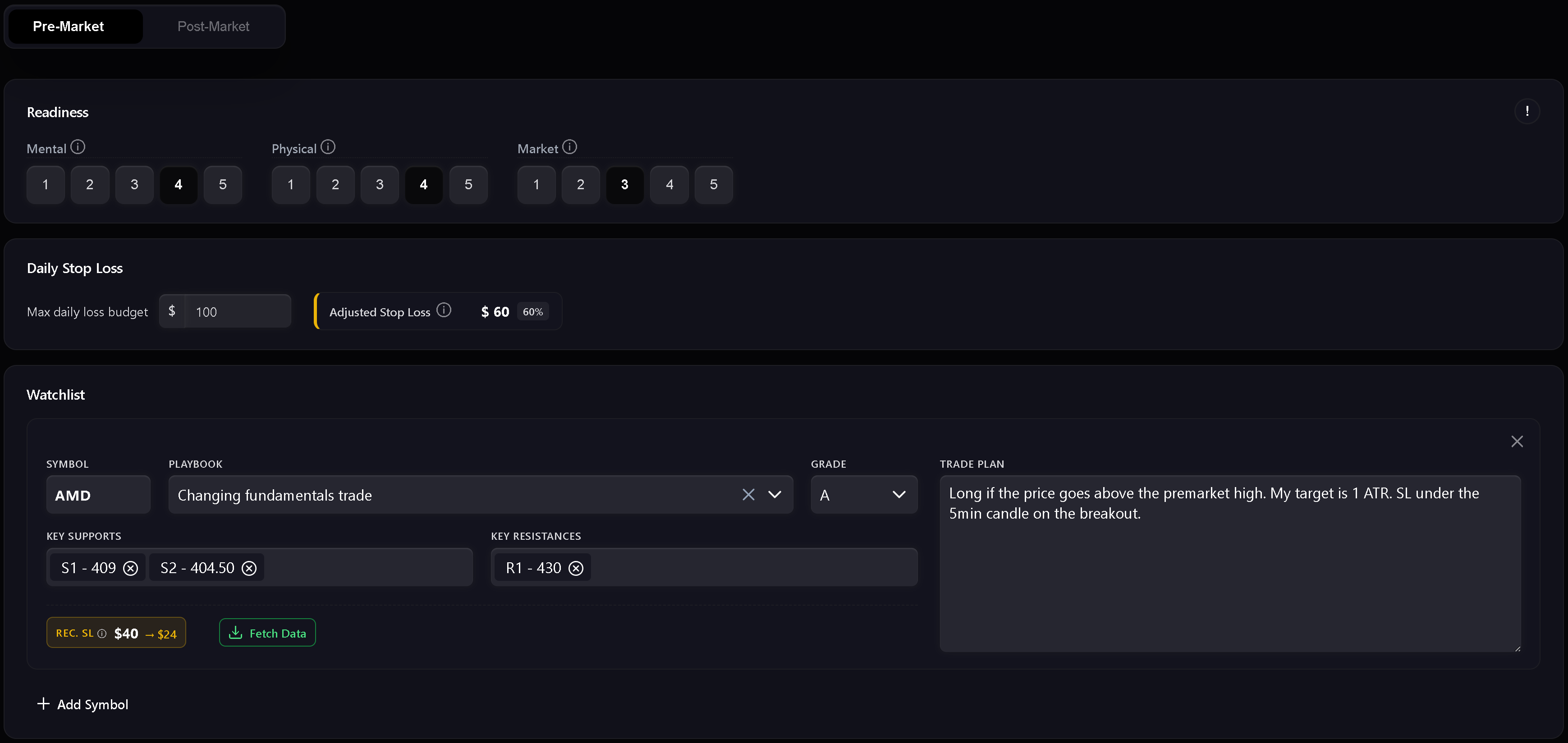
Ватчліст (Watchlist)
У ватчлісті формується план дій за окремими акціями. Кожен рядок містить тикер, стратегію з плейбука, очікувану якість (Grade), цінові рівні та короткий план входу. Числові рівні автоматично валідуються для подальшого відображення на графіках.
Передача фокусу з Дашборду (Focus Handoff)
Віджети дашборду можуть передавати рекомендації щодо фокусу уваги безпосередньо у Daily Plan наступного дня. Якщо дата збігається, Trandence показує банер із підказкою для автоматичного заповнення поля Focus.
Режим Post-Market (Аналіз сесії)
Розділ розблоковується після заповнення pre-market плану та імпорту угод. Він слугує для підбиття підсумків дня:
- загальна денна оцінка (Day grade);
- якість виконання, контроль ризику та дотримання плану;
- письмова рефлексія: що спрацювало, які помилки було допущено, що змінити завтра.
Швидкі оцінки — це не просто нотатки: вони живлять аналітику періодів календаря, діагностику дашборду та Risk Analyzer.
Суворе ведення журналу (Strict Journaling)
Коли режим суворого журналу увімкнено, Trandence вимагає заповнення основних чек-листів для позначення журналу як завершеного. Якщо обов’язкові поля пропущені, кнопки експорту та бейджі завершення залишаються заблокованими з підказкою, що саме потрібно заповнити.
Періодична аналітика та AI-промпти
Повноцінне заповнення щоденного плану формує основу для всієї аналітики Trandence:
- Алгоритмічні звіти за період: враховують дисципліну сесій, оцінки готовності та дотримання правил у періодичних звітах на дашборді.
- AI-промпти для копіювання: під час копіювання промпту щодо символу для аналізу у власному AI-асистенті pre-market план, оцінки готовності та post-market оцінки автоматично включаються в запит.
- Конектор MCP: зовнішні асистенти, що підключаються через Model Context Protocol, отримують структурований контекст планів і рефлексій.
Потрібна допомога?
Якщо у вас виникли запитання щодо ведення планів на день, зв’яжіться з нашою підтримкою: [email protected].
Потрібна допомога?
Є запитання щодо Плани на день (Daily Plans)? Ми відповідаємо протягом одного робочого дня.