
Daily Plans
Daily Plans combine pre-market preparation et post-market review for a single trading day. They are designed to protect your risque avant le session et make your review specific après le session.
Daily Plans List
Open Journal > Daily Plans to see your plan historique. The list montre:
- Date.
- Pre-market completion.
- Post-market completion.
- Day grade.
- Focus goal.
- Last updated time.
Utilisez New Day Plan to create or open le actuel day’s plan. Existing rows open le full Daily Plan for that date.
Pre-Market Mode
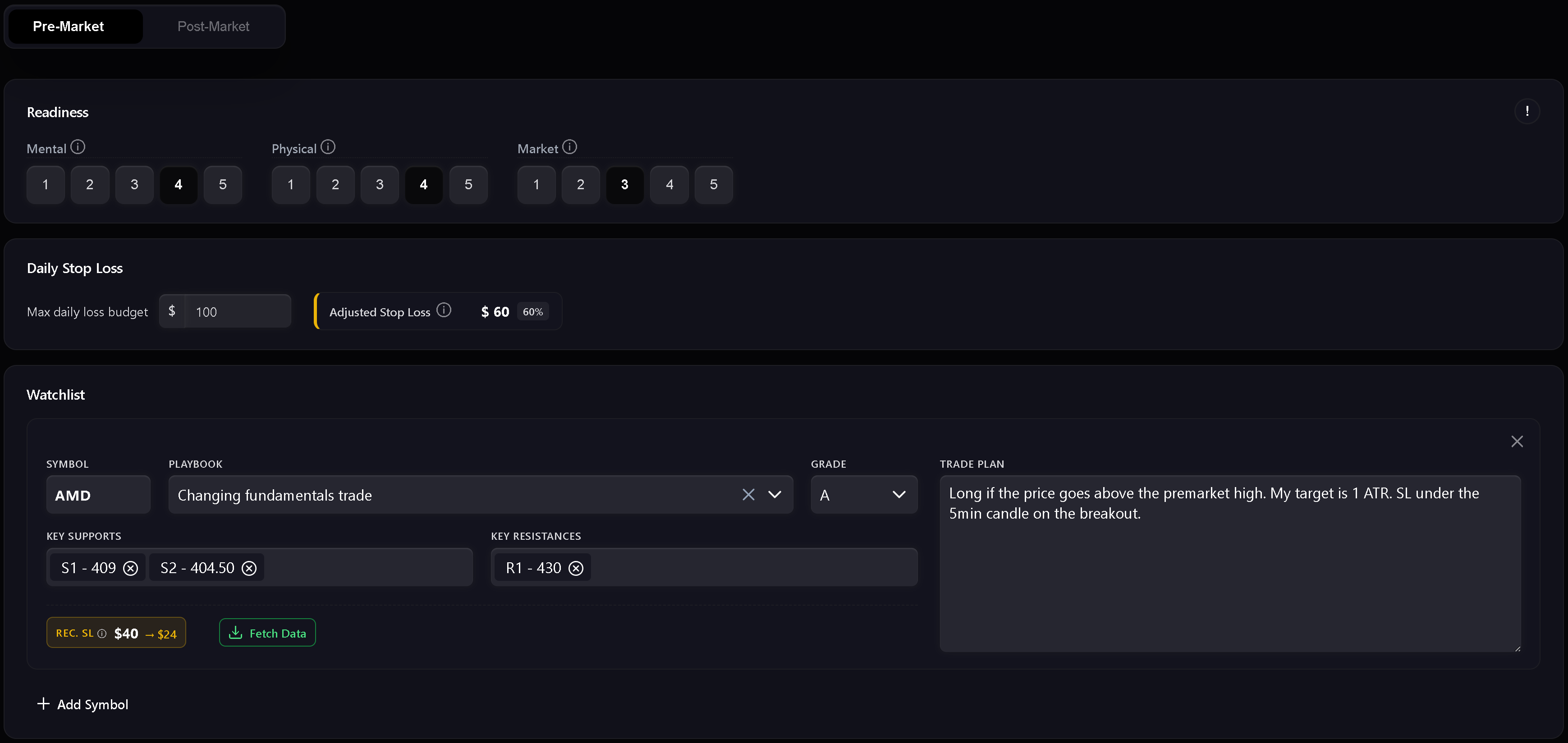
Pre-market is le preparation step. It includes readiness, risque, watchlist, et le written daily market plan.
Utilisez it to record:
- Mental readiness.
- Physical readiness.
- Market readiness.
- Daily stop loss.
- Readiness-adjusted stop loss.
- Watchlist symbols.
- Planned playbooks et setup grades.
- Key support et resistance levels.
- Trade plan notes per symbol.
- Daily market plan.
The readiness score uses mental, physical, et market inputs. Si any readiness dimension is scored at 1, Trandence treats le day as a red zone et trading is not recommended. Higher readiness permet a larger portion of le base daily stop loss.
Watchlist
The watchlist is where you prepare symbol-specific plans avant trading. Each row can include a symbol, playbook, grade, support levels, resistance levels, et a trade plan. Numeric level chips are validated so support et resistance levels stay usable in later review.
Dashboard Focus Handoff
Dashboard modules can send a focus item into le Daily Plan. When le handoff matches le plan date, Trandence montre a focus banner et can prefill le focus field. Les handoffs sont date-scoped so stale focus items from another date are ignorés.
Post-Market Mode
Post-market unlocks après le pre-market plan is complete. It is le day-level review step.
Utilisez it to record:
- Day grade.
- Execution quality.
- Risk control.
- Plan adherence.
- Post-market reflection.
- Carry-forward context for le next session.
The quick checks are not just notes. They feed later Calendar période insights, Dashboard diagnostics, et Risk Analyzer context.
Strict Journaling Completion
Lorsque la journalisation stricte est activée, Trandence exige de remplir l’ensemble de la check-list avant que le journal ne soit considéré comme complet. Si des champs obligatoires sont manquants, les actions d’exportation et les badges de validation restent désactivés avec une info-bulle précisant ce qui manque.
Conditions d’achèvement types :
- Pre-Market complété.
- Post-Market Quick Checks complétés.
- Réflexion rédigée avec un contenu substantiel.
- Données de risque requises présentes si le mode d’affichage l’exige.
Cela garantit que votre journal reflète fidèlement votre processus de trading avant d’alimenter les analyses ultérieures.
Drafts, Dirty State, And Enregistrez Status
Daily Plans track unsaved changes. Si you edit a field et try to leave avant saving, Trandence protects against silent données loss. Draft recovery also aide preserve pre-market text après a hard refresh or tab crash.
The save indicator montre when le plan is saving, saved, or failed.
Analyses de période et prompts IA
Compléter votre plan quotidien fournit la base contextuelle pour l’ensemble des analyses de Trandence :
- Rapports de période algorithmiques : Intègrent la discipline de séance, les scores de préparation et le respect des règles dans le bilan de période du tableau de bord.
- Prompts IA prêts à copier : Lorsque vous copiez un prompt de symbole pour l’analyser avec votre propre assistant IA, votre plan pre-market, votre préparation et vos auto-évaluations post-market sont automatiquement inclus.
- Connecteur MCP : Les assistants externes interrogeant votre journal via le Model Context Protocol reçoivent le contexte complet du plan et des réflexions.
Calendar Version Of Day Report
The same Day Report component is also used from Calendar. In Calendar mode, it focuses on reviewing le sélectionné date et can expose download/share actions when le journal is complete.
Besoin d’aide ?
Si Post-Market est verrouillé, complétez et enregistrez d’abord la section Pre-Market. Si les actions d’exportation sont désactivées, suivez l’info-bulle indiquant les éléments manquants ou écrivez à [email protected].
Besoin d'aide ?
Des questions sur Daily Plans ? Nous répondons sous un jour ouvrable.