
Planos diários
Os Planos diários combinam a preparação pré-mercado e a revisão pós-mercado para cada dia de trading. Eles foram desenhados para proteger seu capital antes da sessão e tornar sua revisão criteriosa e objetiva após o fechamento.
Lista de planos diários
Abra Diário > Planos diários para ver o histórico dos seus planos. A lista exibe:
- Data.
- Conclusão do pré-mercado.
- Conclusão do pós-mercado.
- Nota do dia.
- Meta de foco.
- Horário da última atualização.
Use Novo plano diário para criar ou abrir o plano do dia atual. As linhas existentes abrem o plano diário completo daquela data.
Modo Pré-mercado
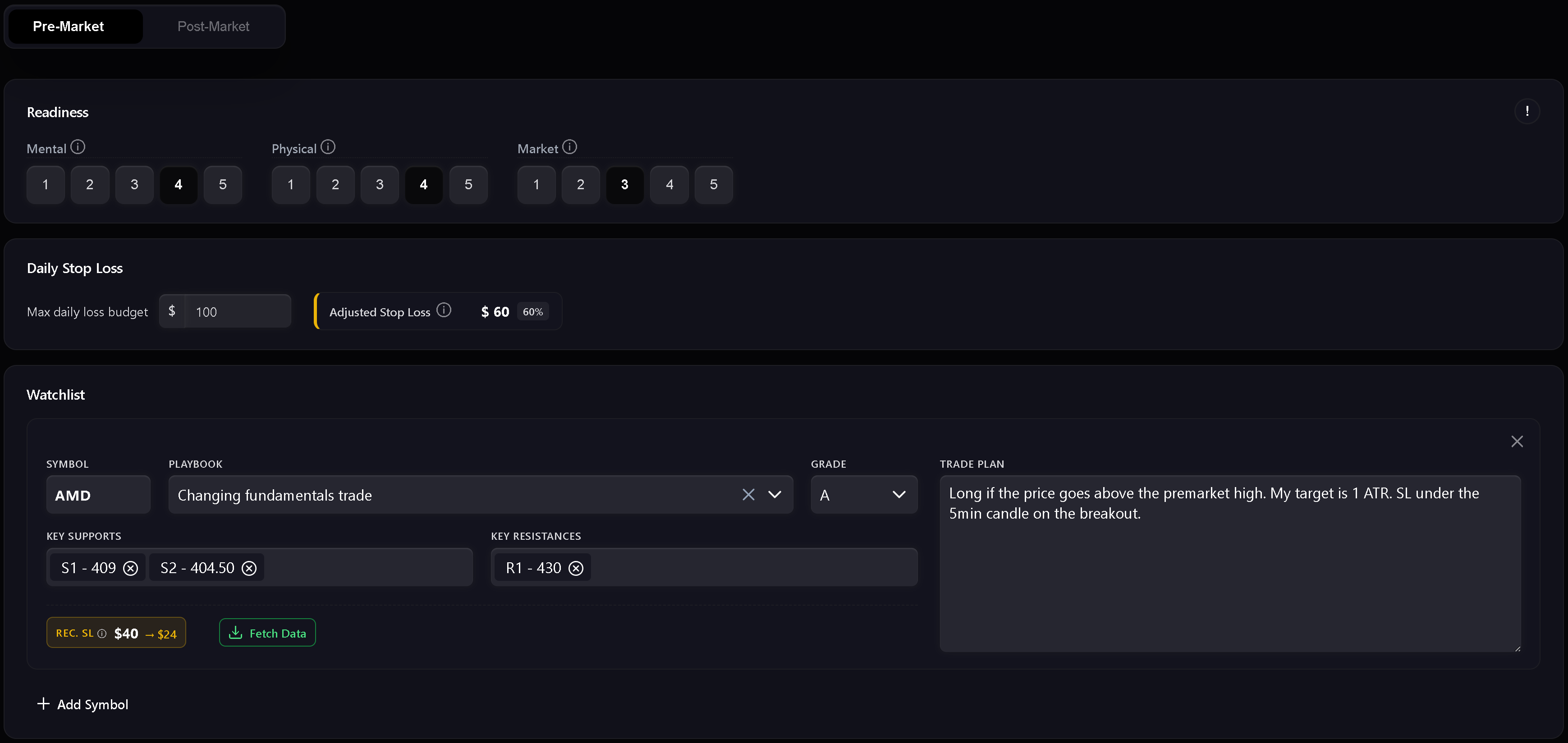
O pré-mercado é a etapa de preparação fundamental. Ele inclui pontuação de prontidão, gestão de risco, watchlist e o plano diário de mercado por escrito.
Use-o para registrar:
- Prontidão mental.
- Prontidão física.
- Prontidão para as condições de mercado.
- Daily Stop Loss.
- Stop loss ajustado pela prontidão.
- Símbolos da watchlist.
- Playbooks planejados e graus de qualidade do setup.
- Níveis-chave de suporte e resistência.
- Notas do plano de trade por símbolo.
- Plano geral de mercado para a sessão.
A pontuação de prontidão combina parâmetros mentais, físicos e de mercado. Se qualquer dimensão de prontidão receber nota 1, o Trandence considera o dia como zona vermelha e recomenda não operar. Uma prontidão maior permite alocar uma parcela maior do stop loss diário base.
Watchlist
A watchlist é onde você prepara planos operacionais específicos para cada ativo antes de iniciar as operações. Cada linha pode incluir símbolo, playbook, grau de qualidade, níveis de suporte, níveis de resistência e plano de trade. Os níveis numéricos são validados para permanecerem utilizáveis em revisões posteriores.
Transferência de foco do Dashboard
Os módulos do Dashboard podem enviar um objetivo de foco diretamente para o Plano diário. Quando o encaminhamento coincide com a data do plano, o Trandence exibe um aviso de foco e preenche automaticamente o campo. Os encaminhamentos respeitam a data, ignorando metas de datas anteriores.
Modo Pós-mercado
O pós-mercado é desbloqueado após o plano pré-mercado ser concluído e salvo. É a etapa de revisão e balanço ao final do dia.
Use-o para registrar:
- Nota do dia.
- Qualidade da execução.
- Controle de risco.
- Aderência ao plano.
- Reflexão pós-mercado.
- Aprendizados a levar para a próxima sessão.
As checagens rápidas não são meras anotações: elas alimentam as estatísticas de período do calendário, o diagnóstico do dashboard e o Risk Analyzer.
Preenchimento rigoroso do diário
Quando o modo de diário rigoroso está ativado, o Trandence exige o preenchimento da checklist principal antes de considerar o diário finalizado. Se campos obrigatórios estiverem ausentes, as ações de exportação e os selos de conclusão permanecem desativados, com uma dica explicando o que está faltando.
Requisitos típicos de preenchimento incluem:
- Pré-mercado concluído.
- Checagens rápidas pós-mercado concluídas.
- Reflexão preenchida com texto significativo.
- Informações de risco obrigatórias presentes conforme o modo de exibição de risco selecionado.
Isso garante que seu diário reflita fielmente seu processo operacional real antes de alimentar as análises da plataforma.
Rascunhos, alterações não salvas e status de salvamento
Os Planos diários monitoram alterações não salvas para evitar perda acidental de dados ao sair da página. A recuperação de rascunhos também protege o texto digitado no pré-mercado em caso de recarregamento forçado ou fechamento da aba.
O indicador de salvamento mostra com clareza se o plano está salvando, salvo ou se ocorreu algum erro.
Estatísticas de período e prompts de IA
Concluir o plano diário fornece a base de contexto necessária para as análises do Trandence:
- Relatórios de período algorítmicos : Integram a disciplina da sessão, as notas de prontidão e a aderência às regras na revisão periódica do dashboard.
- Prompts de cópia para IA : Ao copiar o prompt de um símbolo para analisar no seu assistente de IA pessoal, seu plano pré-mercado, prontidão e autoavaliações pós-mercado são incluídos automaticamente.
- Conector MCP : Assistentes externos que consultam seu diário pelo Model Context Protocol recebem o contexto estruturado de planos e reflexões.
Versão do Relatório diário no Calendário
O mesmo componente do Relatório diário pode ser acessado pelo Calendário. No modo Calendário, o foco é revisar a data selecionada, permitindo ações de download e compartilhamento quando o diário está concluído.
Precisa de ajuda?
Se o Pós-mercado estiver bloqueado, conclua e salve primeiro a seção Pré-mercado. Se as ações de exportação estiverem desativadas, siga as orientações do aviso na tela ou entre em contato pelo e-mail [email protected].
Precisa de ajuda?
Dúvidas sobre Planos diários? Respondemos em até um dia útil.