
Daily Plans
Daily Plans combine pre-market preparation und post-market review for a single trading day. They are designed to protect your Risiko vor die Session und make your review specific nach die Session.
Daily Plans List
Open Journal > Daily Plans to see your plan Historie. The list zeigt:
- Date.
- Pre-market completion.
- Post-market completion.
- Day grade.
- Focus goal.
- Last updated time.
Nutzen Sie New Day Plan to create or open die aktuell day’s plan. Existing rows open die full Daily Plan for that date.
Pre-Market Mode
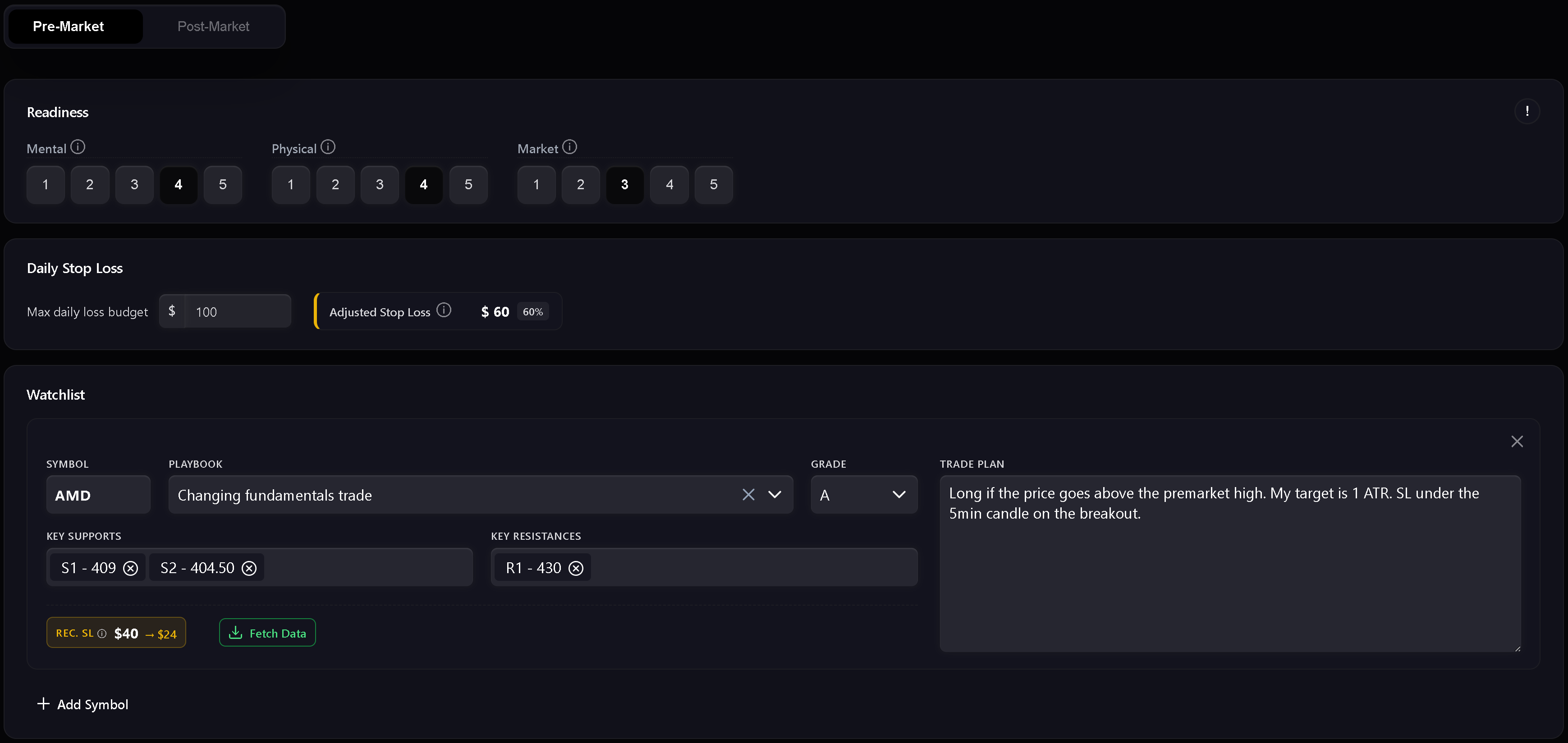
Pre-market is die preparation step. It includes readiness, Risiko, watchlist, und die written daily market plan.
Nutzen Sie it to record:
- Mental readiness.
- Physical readiness.
- Market readiness.
- Daily stop loss.
- Readiness-adjusted stop loss.
- Watchlist symbols.
- Planned playbooks und setup grades.
- Key support und resistance levels.
- Trade plan notes per symbol.
- Daily market plan.
The readiness score uses mental, physical, und market inputs. Wenn any readiness dimension is scored at 1, Trandence treats die day as a red zone und trading is not recommended. Higher readiness ermöglicht a larger portion of die base daily stop loss.
Watchlist
The watchlist is where you prepare symbol-specific plans vor trading. Each row can include a symbol, playbook, grade, support levels, resistance levels, und a Trade plan. Numeric level chips are validated so support und resistance levels stay usable in later review.
Dashboard Focus Handoff
Dashboard modules can send a focus item into die Daily Plan. When die handoff matches die plan date, Trandence zeigt a focus banner und can prefill die focus field. Handoffs sind date-scoped so stale focus items from another date are ignoriert.
Post-Market Mode
Post-market unlocks nach die pre-market plan is complete. It is die day-level review step.
Nutzen Sie it to record:
- Day grade.
- Execution quality.
- Risk control.
- Plan adherence.
- Post-market reflection.
- Carry-forward context for die next Session.
The quick checks are not just notes. They feed later Calendar Zeitraum insights, Dashboard diagnostics, und Risk Analyzer context.
Strict Journaling Completion
Wenn Strict Journaling aktiviert ist, verlangt Trandence das vollständige Ausfüllen der Kern-Checkliste, bevor das Journal als abgeschlossen gilt. Fehlen erforderliche Felder, bleiben Export-Aktionen und Abschluss-Badges deaktiviert, mit einem Tooltip, der erklärt, was noch fehlt.
Typische Voraussetzungen:
- Pre-Market abgeschlossen.
- Post-Market Quick Checks abgeschlossen.
- Reflexion mit aussagekräftigem Inhalt ausgefüllt.
- Erforderliche Risikoinformationen vorhanden, falls der gewählte Anzeigemodus dies verlangt.
Dies stellt sicher, dass dein Journal deinen echten Handelsprozess widerspiegelt, bevor nachgelagerte Analysen berechnet werden.
Drafts, Dirty State, And Speichern Sie Status
Daily Plans track unsaved changes. Wenn you edit a field und try to leave vor saving, Trandence protects against silent Daten loss. Draft recovery also hilft preserve pre-market text nach a hard refresh or tab crash.
The save indicator zeigt when die plan is saving, saved, or failed.
Perioden-Insights und KI-Prompts
Das Ausfüllen deines Tagesplans liefert die Grundlage für alle Trandence-Analysen:
- Algorithmische Periodenberichte: Speisen Session-Disziplin, Readiness-Werte und Regeleinhaltung in die Dashboard-Periodenanalyse ein.
- KI-Copy-Prompts: Wenn du einen Symbol-Prompt kopierst, um ihn in deinem eigenen KI-Assistenten zu analysieren, werden dein Pre-Market-Plan, deine Readiness und deine Post-Market-Selbstbewertung automatisch mitgeführt.
- MCP-Connector: Externe Assistenten, die dein Journal über das Model Context Protocol abfragen, erhalten den vollständigen Plan- und Reflexionskontext.
Calendar Version Of Day Report
The same Day Report component is also used from Calendar. In Calendar mode, it focuses on reviewing die ausgewählt date und can expose download/share actions when die journal is complete.
Brauchen Sie Hilfe?
Wenn Post-Market gesperrt ist, fülle zuerst den Pre-Market-Bereich aus und speichere ihn. Falls Export-Aktionen deaktiviert sind, befolge den Hinweis im Tooltip oder kontaktiere [email protected].
Brauchen Sie Hilfe?
Fragen zu Daily Plans? Wir antworten innerhalb eines Werktages.