
Daily Plans
Daily Plans combine pre-market preparation y post-market review for a single trading day. They are designed to protect your riesgo antes el sesión y make your review specific después el sesión.
Daily Plans List
Open Journal > Daily Plans to see your plan historial. The list muestra:
- Date.
- Pre-market completion.
- Post-market completion.
- Day grade.
- Focus goal.
- Last updated time.
Use New Day Plan to create or open el actual day’s plan. Existing rows open el full Daily Plan for that date.
Pre-Market Mode
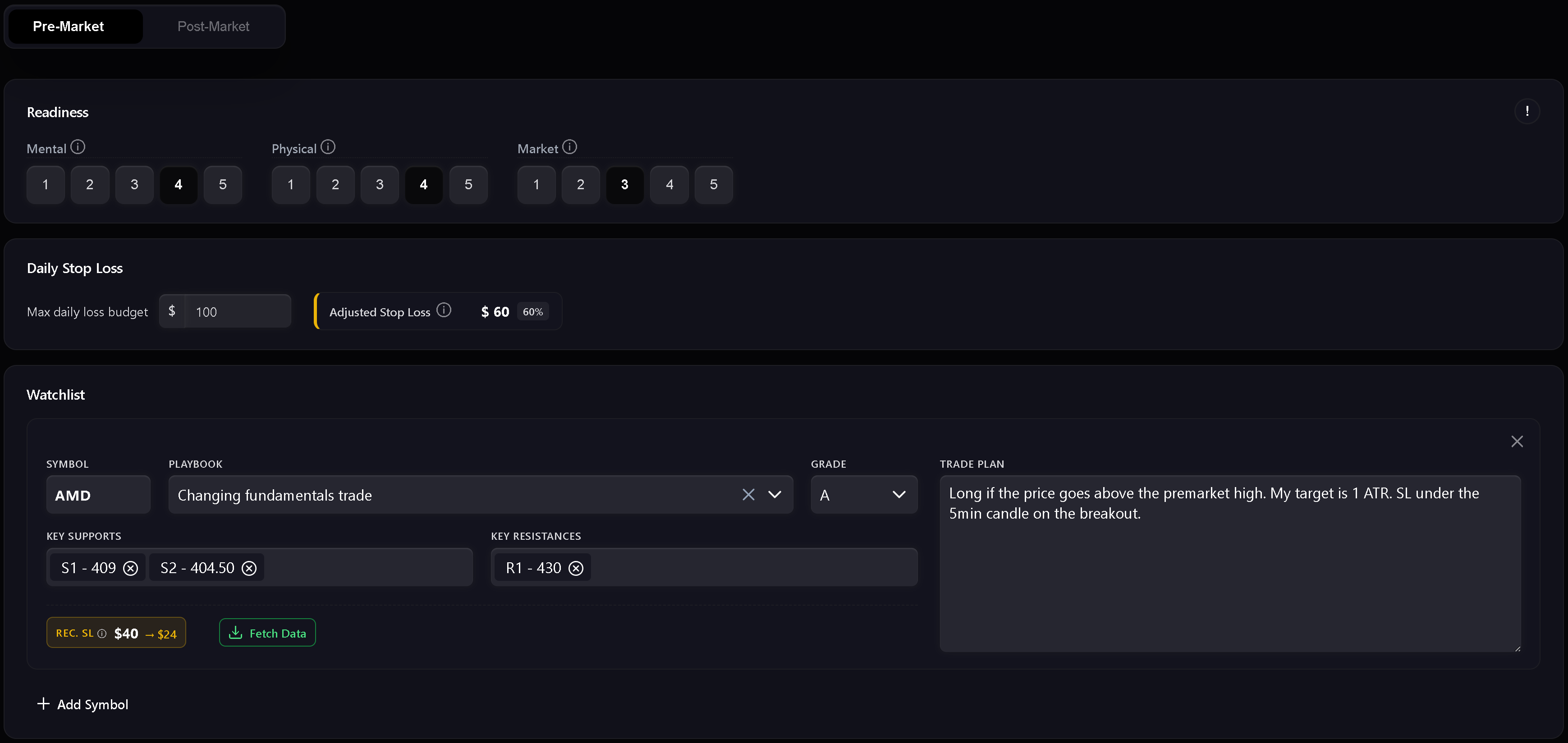
Pre-market is el preparation step. It includes readiness, riesgo, watchlist, y el written daily market plan.
Use it to record:
- Mental readiness.
- Physical readiness.
- Market readiness.
- Daily stop loss.
- Readiness-adjusted stop loss.
- Watchlist symbols.
- Planned playbooks y setup grades.
- Key support y resistance levels.
- Trade plan notes per symbol.
- Daily market plan.
The readiness score uses mental, physical, y market inputs. Si any readiness dimension is scored at 1, Trandence treats el day as a red zone y trading is not recommended. Higher readiness permite a larger portion of el base daily stop loss.
Watchlist
The watchlist is where you prepare symbol-specific plans antes de trading. Each row can include a symbol, playbook, grade, support levels, resistance levels, y a trade plan. Numeric level chips are validated so support y resistance levels stay usable in later review.
Dashboard Focus Handoff
Dashboard modules can send a focus item into el Daily Plan. When el handoff matches el plan date, Trandence muestra a focus banner y can prefill el focus field. Los handoffs están date-scoped so stale focus items from another date are ignorados.
Post-Market Mode
Post-market unlocks después el pre-market plan is complete. It is el day-level review step.
Use it to record:
- Day grade.
- Execution quality.
- Risk control.
- Plan adherence.
- Post-market reflection.
- Carry-forward context for el next sesión.
The quick checks are not just notes. They feed later Calendar periodo insights, Dashboard diagnostics, y Risk Analyzer context.
Strict Journaling Completion
Cuando el registro estricto está habilitado, Trandence requiere completar la lista de verificación básica antes de considerar el diario terminado. Si faltan campos requeridos, las acciones de exportación y las insignias de finalización permanecerán deshabilitadas con un tooltip que explica qué falta.
Requisitos típicos de finalización:
- Pre-Market completado.
- Post-Market Quick Checks completados.
- Reflexión completada con contenido significativo.
- Información de riesgo requerida presente si el modo de visualización lo exige.
Esto garantiza que tu diario refleje fielmente tu proceso operativo antes de alimentar las analíticas posteriores.
Drafts, Dirty State, And Guarde Status
Daily Plans track unsaved changes. Si you edit a field y try to leave antes saving, Trandence protects against silent datos loss. Draft recovery also ayuda preserve pre-market text después a hard refresh or tab crash.
The save indicator muestra when el plan is saving, saved, or failed.
Información de período y prompts de IA
Completar tu plan diario proporciona la base contextual para las analíticas de Trandence:
- Informes de período algorítmicos: Alimentan la disciplina de la sesión, las puntuaciones de readiness y el cumplimiento de reglas en la revisión del período del dashboard.
- Prompts de IA listos para copiar: Al copiar un prompt de símbolo para analizarlo con tu propio asistente de IA, tu plan pre-market, tu readiness y tu autoevaluación post-market se incluyen automáticamente.
- Conector MCP: Los asistentes externos que consultan tu diario mediante el Model Context Protocol reciben el contexto completo del plan y las reflexiones.
Calendar Version Of Day Report
The same Day Report component is also used from Calendar. In Calendar mode, it focuses on reviewing el seleccionado date y can expose download/share actions when el journal is complete.
¿Necesita ayuda?
Si Post-Market está bloqueado, completa y guarda primero la sección Pre-Market. Si las acciones de exportación están deshabilitadas, sigue el tooltip que indica los elementos faltantes o contacta con [email protected].
¿Necesitas ayuda?
¿Preguntas sobre Daily Plans? Respondemos en un día hábil.