
Etiquetas Comportamentais
As etiquetas comportamentais (Behavioral Tags) são as marcações automáticas do Trandence para mapear padrões de execução com alto risco emocional. Elas ajudam você a identificar exatamente quando a sua postura operacional mudou após perdas, vitórias consecutivas, fases de drawdown ou pela pressão de reentradas repetidas.
Essas marcações funcionam de maneira totalmente independente das suas etiquetas manuais. As etiquetas manuais são criadas e editadas diretamente por você; as etiquetas comportamentais são geradas pelo motor comportamental a partir da sequência das suas operações e da configuração de comportamento ativa.
Onde Aparecem as Etiquetas Comportamentais
Os sinais comportamentais são integrados em diferentes áreas da plataforma:
- Trades (Operações): Selos (badges) posicionados ao lado dos ativos na tabela principal de operações.
- Calendar (Calendário): Marcadores visuais nas linhas detalhadas por dia ou por símbolo.
- Charts (Gráficos): Marcadores em forma de diamante violeta nos gráficos de ação do preço e de P&L, com os detalhes da etiqueta disponíveis em descrições suspensas (tooltips) ou textos de apoio.
- Dashboard Weaknesses (Pontos Fracos no Painel): Cartões analíticos como Cost of Tilt (Custo do Tilt), Behavioral Summary (Resumo Comportamental) e vazamentos de capital.
- Calendar Period Insights (Diagnósticos Periódicos do Calendário): Frequência de padrões, custo acumulado de tilt e diagnósticos do intervalo selecionado.
- Symbol Reports (Relatórios por Ativo): Apoio analítico com etiquetas comportamentais e contexto de erros em nível de ativo individual.
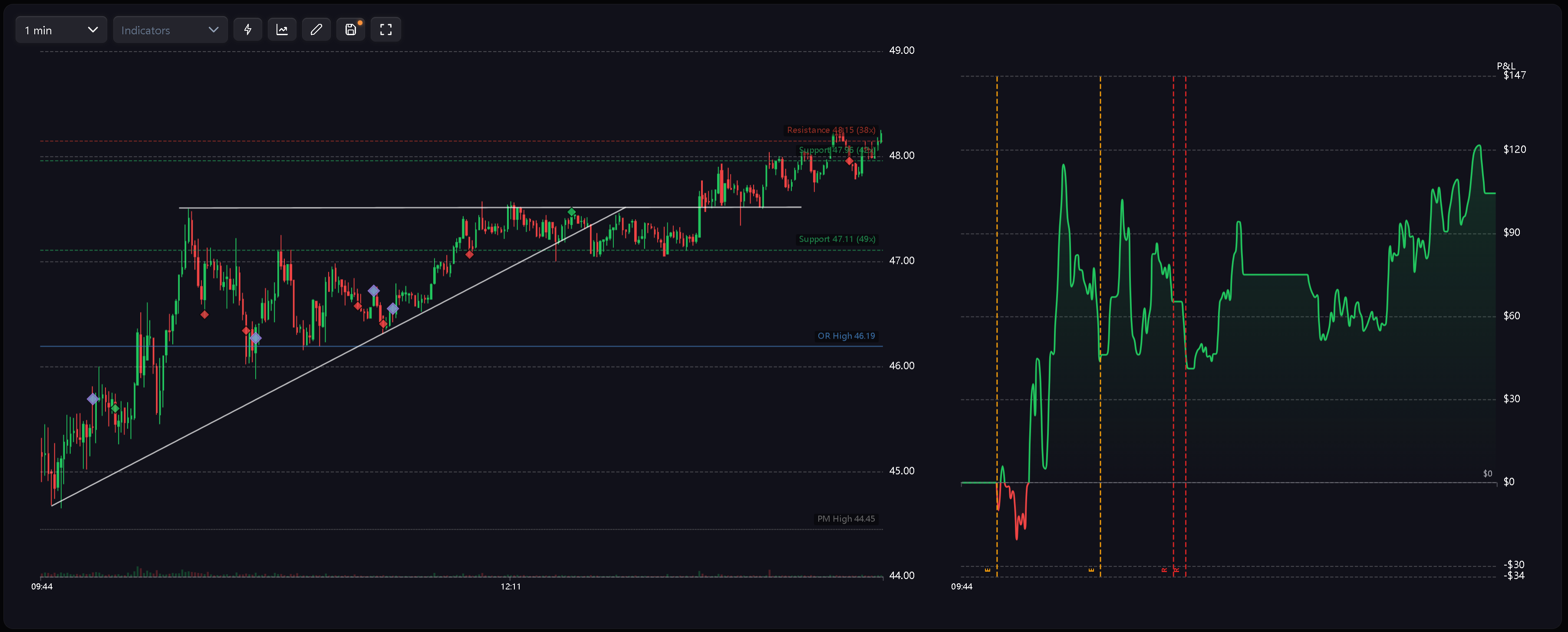
Códigos das Etiquetas
As etiquetas comportamentais utilizam códigos curtos para manter a leitura limpa e objetiva, tanto em tabelas quanto em gráficos:
- R — Revenge (Vingança): Uma nova posição é aberta pouco tempo após o fechamento de uma operação com perda.
- RS — Revenge Sizing (Lote por Vingança): Uma operação pós-prejuízo é executada com tamanho de lote significativamente inflado.
- D — Desperation Entry (Entrada por Desespero): Operação executada em sequência a uma sequência contínua de perdas.
- E — Euphoria (Euforia): Operação aberta imediatamente após uma sequência consistente de vitórias.
- CA — Catastrophic Averaging (Preço Médio Catastrófico): O trader aumenta a posição perdedora em um momento em que o drawdown já é severo em relação ao limite diário de perda (daily stop loss).
Os gráficos utilizam um marcador padronizado em losango violeta para distinguir visualmente os eventos comportamentais das marcações verdes e vermelhas de execução regular. O significado específico de cada evento é detalhado pelo código ou na tooltip.
Avisos de Sessão e Multidias
O motor de comportamento também gera alertas de nível gerencial voltados ao risco amplo:
- Tilt Zone Approached (Zona de Tilt Iminente): A operação continua mesmo após o resultado do dia ter se aproximado perigosamente do limite de risco.
- Excessive Fee Drag (Desgaste Excessivo por Taxas): O volume de corretagem e emolumentos torna-se expressivo a ponto de distorcer o resultado da sessão.
- Risk Downgrade Required (Redução de Risco Necessária): Rompimentos sucessivos do daily stop loss em múltiplos dias indicam a necessidade de reduzir sistematicamente a exposição.
Esses avisos alimentam relatórios de período, análises de fraquezas e fluxos de orientação técnica, atuando em nível estratégico em vez de rotular cada trade individualmente.
Como as Etiquetas São Calculadas
As etiquetas comportamentais resultam do processamento da sequência de execuções, do contexto da curva de P&L, das variações de lote (sizing), da classe operacional e dos limites diários de risco.
Diretrizes essenciais de processamento:
- Ordem cronológica: As operações encerradas são examinadas estritamente em ordem de execução.
- Segmentação de estilo: As regras podem ser limitadas individualmente para operações Intraday, Swing ou Position.
- Controle central: A chave mestra de comportamento permite desativar a detecção a qualquer momento.
- Termos reservados: As nomenclaturas das etiquetas comportamentais são exclusivas do sistema e não devem ser repetidas em etiquetas manuais criadas pelo usuário.
Como as etiquetas dependem estritamente do contexto sequencial, qualquer edição ou exclusão de um trade anterior pode recalcular e atualizar as etiquetas das operações subsequentes.
Atualizações Reativas
O sistema foi estruturado para sincronizar e recalcular etiquetas assim que os registros subjacentes são alterados:
- Importação: A importação de novos trades faz os selos surgirem sem demandar reclassificação manual.
- Edição: Alterar uma operação perdedora para vencedora pode quebrar uma série negativa e suprimir selos gerados posteriormente.
- Exclusão: Remover um trade anterior refaz a linha do tempo e reorganiza as etiquetas dependentes dessa sequência.
- Ajustes: Modificar os parâmetros comportamentais reflete instantaneamente em Calendar, Trades, gráficos, Dashboard e diagnósticos do período após a aplicação das novas regras.
Configuração da Detecção
Acesse Settings > Behavior Config para calibrar as regras do motor. Você pode escolher perfis predefinidos (presets), ativar ou pausar a detecção e definir se cada verificação deve abranger trades de Intraday, Swing ou Position.
Para conferir o fluxo completo de parametrização, consulte Configurações de Comportamento.
Artigos Relacionados
- Configurações de Comportamento
- Detecção de Tilt
- O Efeito Euforia
- Painel de Controle (Dashboard)
- Diagnósticos Periódicos do Calendário
Precisa de ajuda?
Se um selo comportamental parecer inesperado, verifique primeiramente os horários do trade, o P&L, o perfil de comportamento (preset) selecionado, as regras ativas e os filtros de classe operacional (Intraday, Swing ou Position). Para suporte adicional, entre em contato pelo e-mail [email protected].
Precisa de ajuda?
Dúvidas sobre Etiquetas Comportamentais? Respondemos em até um dia útil.