
Verhaltensbezogene Tags
Verhaltensbezogene Tags (Behavioral Tags) sind die automatisierten Kennzeichnungen von Trandence für emotional riskante Ausführungsmuster. Sie machen sichtbar, wann sich das Trading-Verhalten nach Verlusten, Gewinnen, Drawdowns oder dem Druck wiederholter Wiedereinstiege verändert hat.
Diese Tags arbeiten unabhängig von Ihren manuellen Tags. Manuelle Tags werden von Ihnen selbst erstellt und gepflegt; Verhaltens-Tags generiert die Behavioral Engine automatisch auf Basis Ihrer Trade-Abfolge sowie der aktuell hinterlegten Verhaltenskonfiguration.
Wo Verhaltens-Tags sichtbar werden
Verhaltensorientierte Signale erscheinen an verschiedenen Stellen der Plattform:
- Trades (Trades-Tabelle): Kennzeichnungs-Badges direkt neben den Tickersymbolen in der Hauptübersicht.
- Calendar (Kalender): Badges in den aufgeklappten Tages- oder Symbol-Detailzeilen.
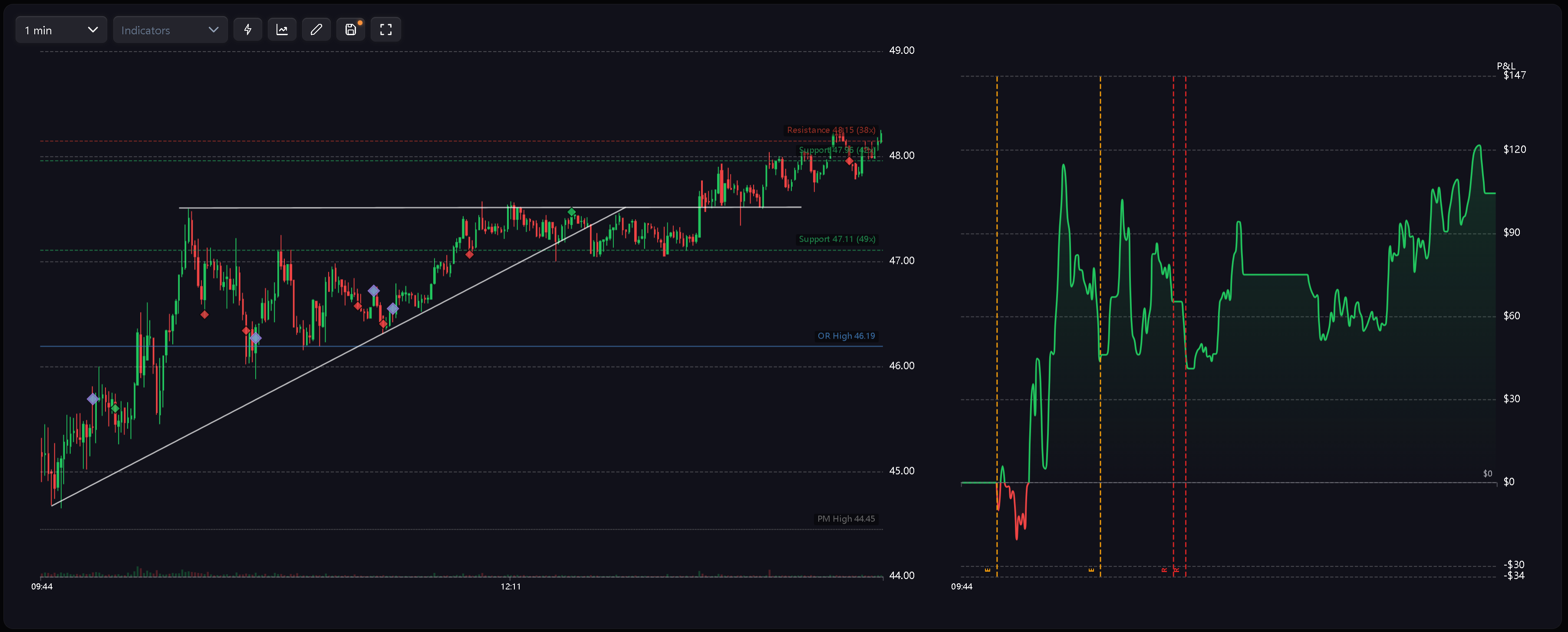
- Charts (Charts): Violette Rautenmarkierungen auf den Kurs- und P&L-Charts mit detaillierten Tag-Informationen in Tooltips oder Beschriftungen.
- Dashboard Weaknesses (Schwachstellen im Dashboard): Analysekarten wie Cost of Tilt (Kosten durch Tilt), Behavioral Summary (Verhaltensübersicht) sowie Berichte zu systematischen Kapitalabflüssen (Leaks).
- Calendar Period Insights (Perioden-Insights im Kalender): Häufigkeit von Fehlverhaltensmustern, aufgelaufene Tilt-Kosten und periodenbezogene Kontextdiagnosen.
- Symbol Reports (Berichte nach Symbol): Verhaltens-Tags und Fehlerkontexte als strukturierte Grundlage für Auswertungen auf Ticker-Ebene.
Tag-Kürzel
Verhaltens-Tags nutzen prägnante Kürzel, um in Tabellen und Charts übersichtlich zu bleiben:
- R — Revenge (Revenge-Trade): Ein neuer Trade wird kurz nach dem Ausstoppen einer Verlustposition eröffnet.
- RS — Revenge Sizing (Revenge-Positionsgröße): Ein Folge-Trade nach einem Verlust wird mit einer auffällig überdimensionierten Positionsgröße eingegangen.
- D — Desperation Entry (Verzweiflungseinstieg): Ein Trade wird unmittelbar nach einer Verlustserie eröffnet.
- E — Euphoria (Euphorie-Trade): Ein Einstieg erfolgt direkt im Anschluss an eine ausgeprägte Gewinnserie.
- CA — Catastrophic Averaging (Katastrophales Verbilligen): Eine Verlustposition wird weiter aufgestockt, obwohl der Drawdown im Verhältnis zum täglichen Stop-Loss (Daily Stop Loss) bereits kritische Ausmaße erreicht hat.
In Charts kommt einheitlich ein violetter Rauten-Marker zum Einsatz, um Verhaltensereignisse optisch klar von den regulären grünen und roten Ausführungsmarkern abzuheben. Das konkrete Muster wird über das Kürzel oder den Tooltip aufgeschlüsselt.
Sitzungs- und mehrtägige Warnungen
Die Verhaltens-Engine erzeugt zudem übergeordnete Warnhinweise für das übergeordnete Risikomanagement:
- Tilt Zone Approached (Tilt-Zone erreicht): Der Handel wird fortgesetzt, obwohl der Tagesverlust bereits gefährlich nahe am definierten Risikolimit liegt.
- Excessive Fee Drag (Übermäßige Gebührenbelastung): Kommissionen und Gebühren erreichen ein Ausmaß, das das Nettoergebnis der Sitzung verzerrt.
- Risk Downgrade Required (Risikoreduktion erforderlich): Wiederholte Verletzungen des täglichen Stop-Loss über mehrere Tage hinweg erfordern eine systematische Senkung des Positionsrisikos.
Diese Warnungen steuern Periodenanalysen, Schwachstellenberichte und Coaching-Abläufe an, statt als einfache Einzel-Trade-Tags aufzutreten.
Wie Tags berechnet werden
Verhaltens-Tags basieren auf der zeitlichen Abfolge der Trades, dem P&L-Kontext, Änderungen der Positionsgröße (Sizing), der Trade-Kategorie sowie dem übergeordneten Tagesrisiko.
Wichtige Berechnungsregeln:
- Chronologische Reihenfolge: Abgeschlossene Trades werden strikt in der Reihenfolge ihrer Ausführung bewertet.
- Kategorienspezifische Filter: Regeln lassen sich gezielt auf Intraday-, Swing- oder Positions-Trades beschränken.
- Zentraler Schalter: Über den Hauptschalter lässt sich die Verhaltenserkennung bei Bedarf vollständig deaktivieren.
- Geschützte Bezeichnungen: Die Namen der Verhaltens-Tags sind reserviert und dürfen nicht für eigene manuelle Tags vergeben werden.
Da die Vergabe der Tags von der chronologischen Sequenz abhängt, kann das nachträgliche Bearbeiten oder Löschen eines früheren Trades die Tags aller nachfolgenden Trades verändern.
Reaktive Aktualisierungen
Verhaltens-Tags passen sich automatisch an, sobald sich die zugrundeliegende Datenbasis ändert:
- Import: Nach dem Import neuer Trades erscheinen die entsprechenden Badges ohne manuelles Nachtaggen.
- Korrektur: Wird ein Verlust-Trade nachträglich zu einem Gewinntrade korrigiert, kann dies eine Negativserie unterbrechen und nachfolgende Badges entfernen.
- Löschung: Das Entfernen eines früheren Trades verändert die Abfolge und berechnet abhängige Tags neu.
- Einstellungsänderungen: Anpassungen an den Verhaltensregeln aktualisieren Kalender, Trades-Tabelle, Charts, Dashboard und Perioden-Insights sofort auf Basis der neuen Konfiguration.
Erkennung konfigurieren
Über Settings > Behavior Config passen Sie die Erkennungskriterien an. Sie können Voreinstellungen (Presets) wählen, die Erkennung gezielt ein- oder ausschalten und festlegen, ob die jeweilige Regel für Intraday-, Swing- oder Positions-Trades gilt.
Den vollständigen Ablauf finden Sie unter Verhaltenseinstellungen.
Verwandte Artikel
Brauchen Sie Hilfe?
Wenn ein Verhaltens-Badge unerwartet erscheint, überprüfen Sie bitte zuerst die Ausführungszeitpunkte der Trades, das P&L, das ausgewählte Verhaltens-Preset, die aktiven Regeln sowie die Filter nach Trade-Kategorie (Intraday, Swing oder Position). Bei weiteren Fragen erreichen Sie uns unter [email protected].
Brauchen Sie Hilfe?
Fragen zu Verhaltensbezogene Tags? Wir antworten innerhalb eines Werktages.