
Étiquettes Comportementales
Les étiquettes comportementales (Behavioral Tags) sont les marqueurs automatiques de Trandence conçus pour identifier les schémas d’exécution à haut risque émotionnel. Elles permettent d’observer avec précision les moments où votre comportement s’est dégradé après des pertes, des gains, des phases de drawdown ou sous la pression d’entrées répétées.
Ces étiquettes fonctionnent indépendamment de vos étiquettes manuelles. Les étiquettes manuelles sont créées et modifiées directement par vous ; les étiquettes comportementales sont générées par le moteur comportemental à partir de la chronologie de vos ordres et de votre configuration active.
Où Apparaissent les Étiquettes Comportementales
Les signaux comportementaux sont intégrés à plusieurs niveaux de la plateforme :
- Trades (Ordres) : Badges situés à côté des symboles dans le tableau principal des opérations.
- Calendar (Calendrier) : Indicateurs visuels dans les lignes déroulées par jour ou par symbole.
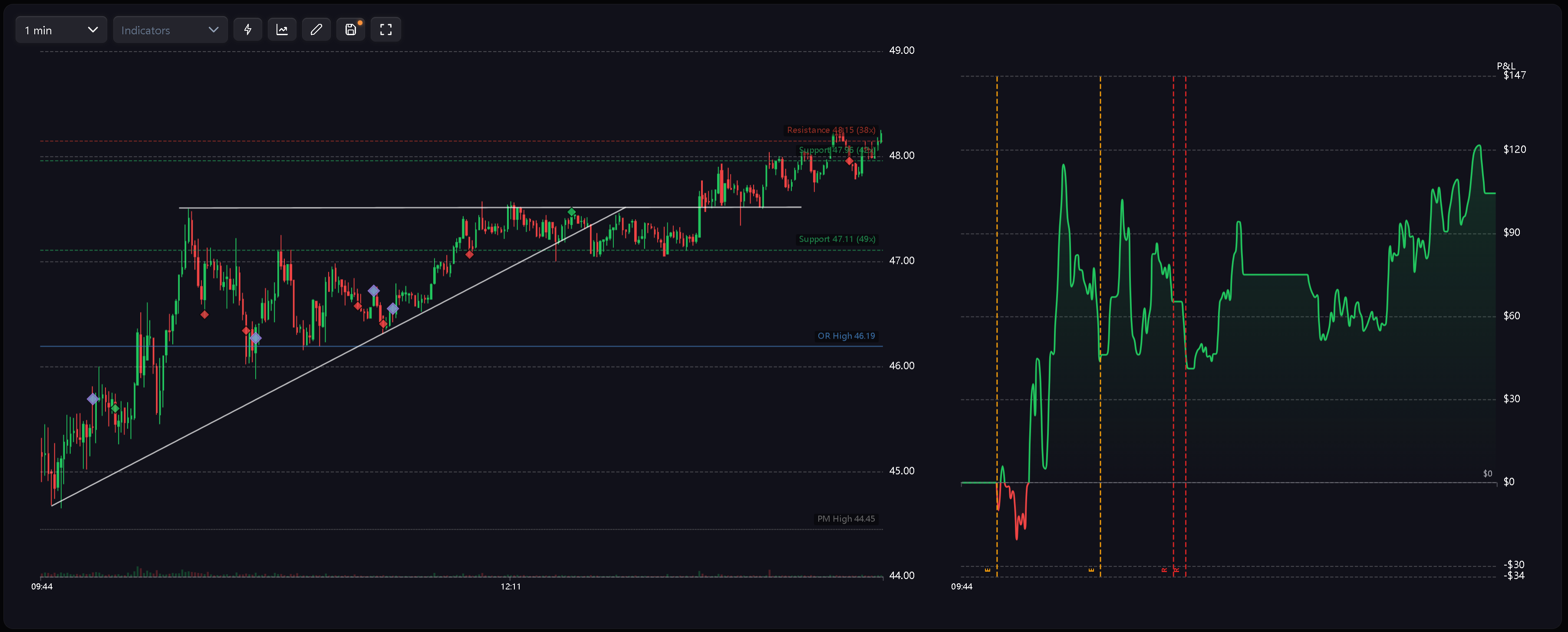
- Charts (Graphiques) : Marqueurs en forme de losange violet sur les graphiques de prix et de P&L, avec le détail accessible via les info-bulles (tooltips) ou les étiquettes superposées.
- Dashboard Weaknesses (Points Faibles du Tableau de Bord) : Cartes d’analyse dédiées, telles que Cost of Tilt (Coût du Tilt), Behavioral Summary (Bilan Comportemental) et détection des fuites de capital.
- Calendar Period Insights (Analyses Périodiques du Calendrier) : Fréquence des comportements, coût accumulé du tilt et diagnostics associés à la période sélectionnée.
- Symbol Reports (Rapports par Symbole) : Contexte d’erreurs et étiquettes comportementales appliqués à l’analyse détaillée par actif.
Codes des Étiquettes
Les étiquettes comportementales utilisent des codes courts afin de préserver une lisibilité optimale dans les tableaux et sur les graphiques :
- R — Revenge (Revanche) : Une nouvelle position est ouverte très peu de temps après la clôture d’une opération perdante.
- RS — Revenge Sizing (Surdimensionnement de Revanche) : Une opération prise après une perte est exécutée avec un volume nettement excessif.
- D — Desperation Entry (Entrée de Désespoir) : Position prise à la suite d’une série continue de pertes.
- E — Euphoria (Euphorie) : Position ouverte immédiatement après une série de gains.
- CA — Catastrophic Averaging (Moyennage Catastrophique) : Le trader renforce une position perdante alors que le drawdown est déjà critique par rapport au stop-loss journalier (daily stop loss).
Les graphiques utilisent un losange violet uniforme afin de distinguer nettement les anomalies comportementales des marqueurs d’exécution verts et rouges. La nature exacte de l’événement est précisée par le code ou dans l’info-bulle.
Avertissements de Session et Multi-Jours
Le moteur comportemental génère également des alertes transversales orientées vers le risque global :
- Tilt Zone Approached (Zone de Tilt Imminente) : L’activité se poursuit alors que la perte de la séance approche dangereusement de la limite de risque autorisée.
- Excessive Fee Drag (Poids Excessif des Frais) : Le cumul des commissions et frais d’intermédiation devient suffisant pour déformer le résultat net de la journée.
- Risk Downgrade Required (Réduction du Risque Requise) : Des dépassements répétés du daily stop loss sur plusieurs séances signalent la nécessité d’une réduction mécanique du risque par ordre.
Ces avertissements alimentent les synthèses périodiques, l’analyse des failles et les flux de coaching plutôt que d’agir comme de simples étiquettes appliquées à chaque trade individuel.
Comment les Étiquettes Sont Calculées
Les étiquettes comportementales reposent sur l’analyse chronologique des ordres, le contexte du P&L, les variations de dimensionnement (sizing), la typologie de trade et les règles de risque quotidien.
Principes de calcul :
- Ordre chronologique : Les ordres clôturés sont analysés strictement dans leur ordre d’exécution.
- Filtrage par style : Les règles peuvent être restreintes indépendamment aux ordres Intraday, Swing ou Position.
- Interrupteur général : L’option principale de configuration permet de désactiver la détection comportementale à tout moment.
- Termes réservés : Les noms des étiquettes comportementales sont réservés par le système et ne doivent pas être attribués à des étiquettes manuelles créées par l’utilisateur.
Puisque les étiquettes dépendent étroitement de la séquence d’exécution, la modification ou la suppression d’un trade antérieur peut recalculer et modifier les étiquettes attribuées aux trades suivants.
Mises à Jour Réactives
Les étiquettes comportementales se synchronisent automatiquement dès que les données sources changent :
- Importation : L’importation de nouveaux trades fait apparaître les badges sans nécessiter de réétiquetage manuel.
- Modification : Corriger un trade perdant en trade gagnant peut interrompre une série négative et supprimer les badges ultérieurs.
- Suppression : Supprimer un ordre antérieur réajuste la chronologie et réactualise les étiquettes dépendantes.
- Paramétrage : Modifier la configuration du comportement met à jour instantanément les vues Calendar, Trades, les graphiques, le Dashboard et les bilans de période selon les règles nouvellement appliquées.
Configuration de la Détection
Accédez à Settings > Behavior Config pour ajuster les seuils du moteur. Vous pouvez sélectionner un profil prédéfini (preset), activer ou désactiver la détection, et déterminer si chaque règle s’applique aux opérations Intraday, Swing ou Position.
Pour découvrir l’ensemble de la procédure, consultez Paramètres de Comportement.
Articles Associés
- Paramètres de Comportement
- Détection du Tilt
- L’Effet Euphorie
- Tableau de Bord (Dashboard)
- Analyses Périodiques du Calendrier
Besoin d’aide ?
Si un badge comportemental apparaît de manière inattendue, vérifiez d’abord l’horodatage de l’ordre, le P&L, le profil comportemental (preset) sélectionné, les règles actives et les filtres de style de trading (Intraday, Swing ou Position). Pour toute question complémentaire, contactez-nous à l’adresse [email protected].
Besoin d'aide ?
Des questions sur Étiquettes Comportementales ? Nous répondons sous un jour ouvrable.