
Etiquetas de Comportamiento
Las etiquetas de comportamiento (Behavioral Tags) son las marcas automáticas de Trandence para catalogar patrones de ejecución con alto riesgo emocional. Le ayudan a detectar cuándo su operativa cambió tras sufrir pérdidas, acumular ganancias, entrar en drawdown o experimentar la presión de reentradas consecutivas.
Estas etiquetas funcionan de manera independiente a sus etiquetas manuales. Las etiquetas manuales son creadas y editadas directamente por usted; las etiquetas de comportamiento son generadas por el motor conductual a partir de la secuencia de sus operaciones y de la configuración de comportamiento activa.
Dónde Aparecen las Etiquetas de Comportamiento
Las señales conductuales se integran en distintas áreas de la plataforma:
- Trades (Operaciones): Distintivos (badges) situados junto a los símbolos en la tabla principal de operaciones.
- Calendar (Calendario): Indicadores visuales en las filas desplegadas por día o por símbolo.
- Charts (Gráficos): Marcadores en forma de rombo violeta en los gráficos de acción del precio y de P&L, con el detalle de la etiqueta accesible mediante descripciones emergentes (tooltips) o etiquetas superpuestas.
- Dashboard Weaknesses (Puntos Débiles en el Panel): Tarjetas de análisis como Cost of Tilt (Coste del Tilt), Behavioral Summary (Resumen Conductual) y fugas operativas.
- Calendar Period Insights (Diagnósticos Periódicos del Calendario): Frecuencia de los patrones, coste acumulado del tilt y análisis de contexto del periodo seleccionado.
- Symbol Reports (Informes por Símbolo): Respaldo analítico con etiquetas de comportamiento y contexto de errores a nivel de activo individual.
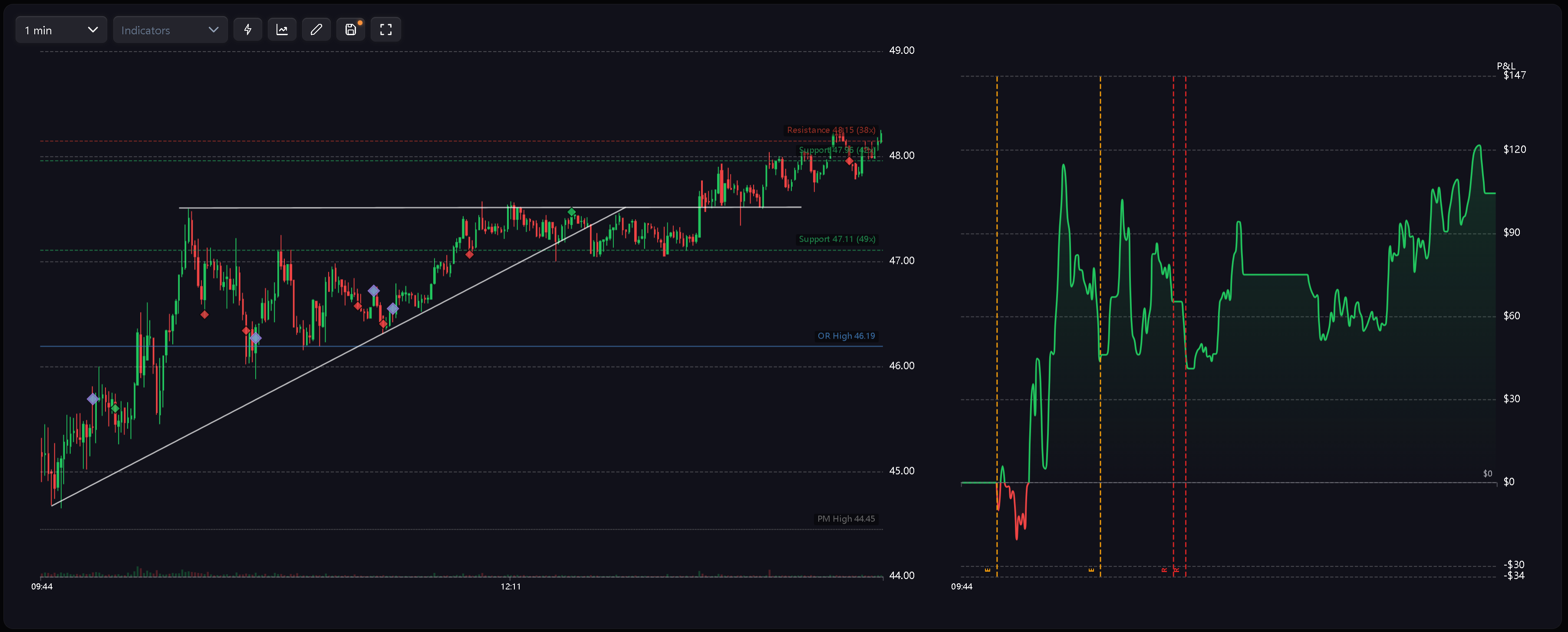
Códigos de las Etiquetas
Las etiquetas de comportamiento emplean códigos abreviados para mantener una lectura limpia y clara tanto en tablas como en gráficos:
- R — Revenge (Venganza): Se abre una nueva posición poco tiempo después de haber cerrado una operación con pérdidas.
- RS — Revenge Sizing (Tamaño por Venganza): Una operación posterior a una pérdida se ejecuta con un tamaño sensiblemente sobredimensionado.
- D — Desperation Entry (Entrada por Desesperación): Operación ejecutada tras encadenar una racha de pérdidas consecutivas.
- E — Euphoria (Euforia): Operación abierta inmediatamente después de una racha ganadora.
- CA — Catastrophic Averaging (Promediado Catastrófico): El operador añade volumen a una posición perdedora cuando el drawdown acumulado ya es grave en relación con el límite de pérdida diaria (daily stop loss).
Los gráficos emplean un rombo violeta unificado para diferenciar visualmente los eventos conductuales de los marcadores verdes y rojos propios de la ejecución. La naturaleza específica de cada etiqueta se identifica mediante su código o a través del tooltip.
Advertencias de Sesión y Multidía
El motor conductual emite asimismo alertas de nivel superior orientadas a la gestión global del riesgo:
- Tilt Zone Approached (Zona de Tilt Inminente): Se continúa operando cuando la sesión ya se encuentra peligrosamente cerca del límite de riesgo establecido.
- Excessive Fee Drag (Lastre Excesivo por Comisiones): El volumen de comisiones y tarifas alcanza un nivel suficiente para distorsionar por completo el balance de la sesión.
- Risk Downgrade Required (Reducción de Riesgo Requerida): La vulneración reiterada del daily stop loss a lo largo de varios días indica la necesidad de reducir sistemáticamente el riesgo por operación.
Estas advertencias alimentan los resúmenes del periodo, el análisis de debilidades y los flujos de coaching, en lugar de actuar como etiquetas directas sobre operaciones individuales.
Cómo se Calculan las Etiquetas
Las etiquetas de comportamiento se derivan del análisis cronológico de las operaciones, el contexto del P&L, las variaciones de tamaño (sizing), la clase de activo y el marco de riesgo diario.
Reglas clave de cálculo:
- Orden cronológico: Las operaciones concluidas se auditan estrictamente en orden temporal.
- Segmentación por estilo: Las reglas pueden acotarse de forma independiente para operaciones Intraday, Swing o Position.
- Control maestro: El interruptor principal de comportamiento puede desactivar la detección automática en cualquier momento.
- Nombres reservados: Las denominaciones de las etiquetas de comportamiento están reservadas por el sistema y no deben utilizarse al crear etiquetas manuales.
Debido a que estas etiquetas dependen estrictamente de la secuencia temporal, modificar o eliminar una operación previa puede recalcular y alterar las etiquetas asignadas a las operaciones posteriores.
Actualizaciones Reactivas
El motor recalcula y sincroniza las etiquetas automáticamente en cuanto los datos subyacentes cambian:
- Importación: Importar nuevas operaciones genera los distintivos correspondientes sin necesidad de etiquetar manualmente.
- Edición: Corregir una operación perdedora y transformarla en ganadora puede romper una racha negativa y suprimir los distintivos posteriores.
- Eliminación: Eliminar una operación anterior reconfigura la secuencia temporal y ajusta las etiquetas consecuentes.
- Ajustes: Cambiar las reglas de comportamiento actualiza el impacto en Calendar, Trades, gráficos, Dashboard y los diagnósticos del periodo tan pronto como entra en vigor la nueva configuración.
Configuración de la Detección
Diríjase a Settings > Behavior Config para ajustar los parámetros del motor. Desde este panel puede seleccionar perfiles predefinidos (presets), activar o suspender la detección automática y definir si cada regla aplica a operativas Intraday, Swing o Position.
Para conocer el procedimiento completo, consulte Ajustes de Comportamiento.
Artículos Relacionados
- Ajustes de Comportamiento
- Detección del Tilt
- El Efecto Euforia
- Panel de Control (Dashboard)
- Diagnósticos Periódicos del Calendario
¿Necesita ayuda?
Si un distintivo conductual aparece de manera inesperada, revise en primer lugar la cronología de la operación, el P&L, el perfil predefinido (preset) seleccionado, las reglas activas y los filtros por tipo de operativa (Intraday, Swing o Position). Si tiene dudas adicionales, escríbanos a [email protected].
¿Necesitas ayuda?
¿Preguntas sobre Etiquetas de Comportamiento? Respondemos en un día hábil.