
Behavioral Tags are Trandence’s automatic labels for emotionally risky execution patterns. They help you see when trading behavior changed after losses, wins, drawdown, or repeated re-entry pressure. These tags are separate from your manual tags. Manual tags are created and edited by you; behavioral tags are generated by the behavioral engine from your trade sequence and current behavior configuration.
Where Behavioral Tags Appear
Behavioral signals can appear across the product:
- Trades - badges next to symbols in the trade table.
- Calendar - badges in expanded day or symbol trade rows.
- Charts - violet diamond markers on price-action and P&L charts, with tag details in tooltips or labels.
- Dashboard Weaknesses - Cost of Tilt, Behavioral Summary, and behavioral leak cards.
- Calendar Period Insights - behavior frequency, Cost of Tilt, and related period diagnostics.
- Symbol Reports - behavioral tags and mistake context can support symbol-level review.
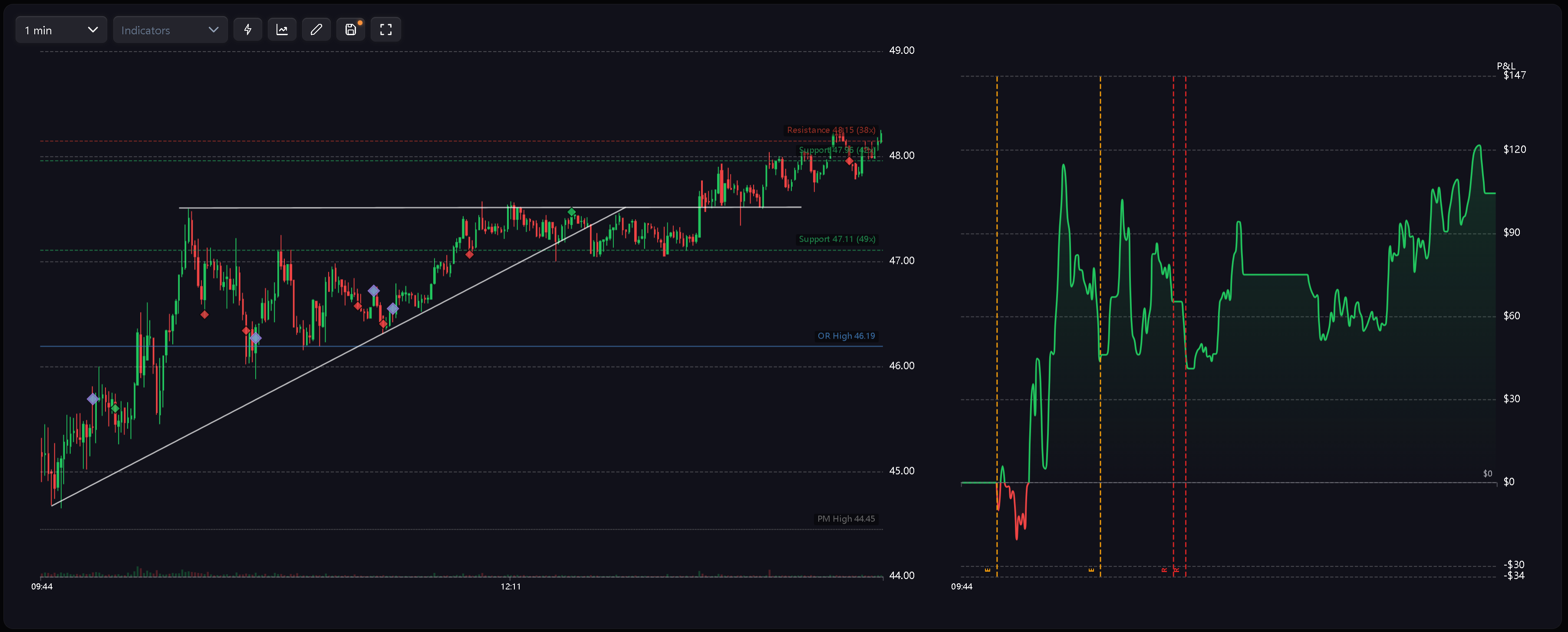
Tag Codes
Behavioral tags use short labels so they stay readable in tables and on charts:
- R - Revenge. A new trade opens shortly after a losing trade closes.
- RS - Revenge Sizing. A follow-up trade after a loss is materially oversized.
- D - Desperation Entry. A trade is taken after a loss streak.
- E - Euphoria. A trade is taken after a win streak.
- CA - Catastrophic Averaging. A trader adds to a losing position while drawdown is already severe relative to the daily stop loss. Charts use a unified violet diamond marker so behavioral events are visually distinct from green/red execution markers. The tag identity is shown through the code or tooltip.
Session And Multi-Day Warnings
The behavior system also supports higher-level warnings:
- Tilt Zone Approached - trading continues after the day has moved close to the risk limit.
- Excessive Fee Drag - commissions and fees become large enough to distort the session result.
- Risk Downgrade Required - repeated daily stop loss breaches suggest a systemic risk reduction is needed. These warnings support period insights, weakness analysis, and coaching flows rather than behaving exactly like manual trade tags.
How Tags Are Calculated
Behavioral tags are based on trade sequence, P&L context, sizing behavior, trade class, and daily risk context. Important rules:
- Completed trades are reviewed in order.
- Rules can be limited to Intraday, Swing, or Position trades.
- The master behavior toggle can disable behavioral detection.
- Behavioral names are reserved and should not be written as user-created manual tags. Because behavioral tags depend on sequence context, editing or deleting an earlier trade can change tags on later trades.
Reactive Updates
Behavioral tags are designed to update when the underlying data changes:
- Importing trades can make badges appear without a manual retag step.
- Editing a losing trade into a winning trade can break a streak and remove later badges.
- Deleting an earlier trade can change sequence-based tags.
- Changing behavior settings can affect Calendar, Trades, charts, Dashboard, and period insights after the effective config updates.
Configuring Detection
Use Settings > Behavior Config to tune the rules. You can choose a preset, enable or disable detection, and decide whether each rule applies to Intraday, Swing, or Position trades. For the full settings workflow, see Behavior Settings.
Related Articles
Need Help?
If a behavioral badge looks unexpected, check the trade timing, P&L, selected behavior preset, enabled rules, and trade class filters first.