
Daily Plans combine pre-market preparation and post-market review for a single trading day. They are designed to protect your risk before the session and make your review specific after the session.
Daily Plans List
Open Journal > Daily Plans to see your plan history. The list shows:
- Date.
- Pre-market completion.
- Post-market completion.
- Day grade.
- Focus goal.
- Last updated time.
Use New Day Plan to create or open the current day’s plan. Existing rows open the full Daily Plan for that date.
Pre-Market Mode
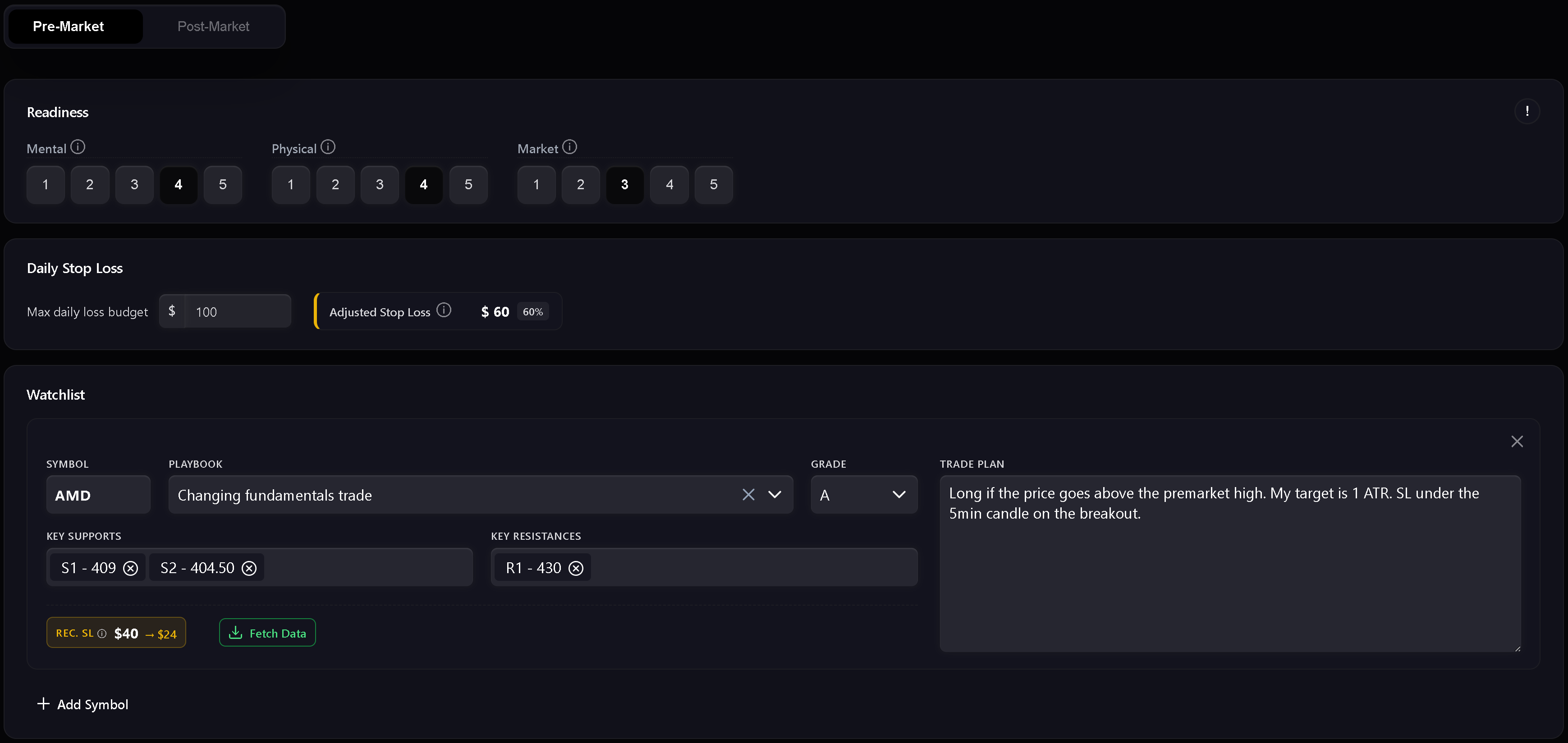
Pre-market is the preparation step. It includes readiness, risk, watchlist, and the written daily market plan.
Use it to record:
- Mental readiness.
- Physical readiness.
- Market readiness.
- Daily stop loss.
- Readiness-adjusted stop loss.
- Watchlist symbols.
- Planned playbooks and setup grades.
- Key support and resistance levels.
- Trade plan notes per symbol.
- Daily market plan.
The readiness score uses mental, physical, and market inputs. If any readiness dimension is scored at 1, Trandence treats the day as a red zone and trading is not recommended. Higher readiness allows a larger portion of the base daily stop loss.
Watchlist And Market Data
The watchlist is where you prepare symbol-specific plans before trading. Each row can include a symbol, playbook, grade, support levels, resistance levels, and a trade plan.
For supported symbols, Fetch Data can load market context such as pre-market volume, pre-market high/low, gap, RVOL, and related metrics. Numeric level chips are validated so support and resistance levels stay usable in later review.
Dashboard Focus Handoff
Dashboard modules can send a focus item into the Daily Plan. When the handoff matches the plan date, Trandence shows a focus banner and can prefill the focus field. Handoffs are date-scoped so stale focus items from another date are ignored.
Post-Market Mode
Post-market unlocks after the pre-market plan is complete. It is the day-level review step.
Use it to record:
- Day grade.
- Execution quality.
- Risk control.
- Plan adherence.
- Post-market reflection.
- Carry-forward context for the next session.
The quick checks are not just notes. They feed later Calendar period insights, Dashboard diagnostics, and Risk Analyzer context.
Strict Journaling And AI Gate
When strict journaling is enabled, Trandence requires the core checklist before the journal is considered complete. If required fields are missing, AI analysis and export actions can be disabled with a tooltip explaining what is missing.
Typical completion requirements include:
- Pre-market completed.
- Post-market quick checks completed.
- Reflection filled with meaningful content.
- Required risk information present when the selected risk display mode needs it.
This prevents AI analysis from grading an incomplete journal as if it were finished.
Drafts, Dirty State, And Save Status
Daily Plans track unsaved changes. If you edit a field and try to leave before saving, Trandence protects against silent data loss. Draft recovery also helps preserve pre-market text after a hard refresh or tab crash.
The save indicator shows when the plan is saving, saved, or failed.
AI Coach And Data Deep Dive
Post-market can expose AI tools when the journal is complete:
- AI Analysis reviews the day using available journal and trade context.
- Data Deep Dive provides a deeper paid/credit-based analysis when credits are available.
If a button is disabled, check the tooltip. It usually points to the incomplete checklist item.
Calendar Version Of Day Report
The same Day Report component is also used from Calendar. In Calendar mode, it focuses on reviewing the selected date and can expose download/share actions when the journal is complete.
Need Help?
If Post-Market is locked, complete and save the Pre-Market section first. If AI tools are disabled, follow the missing-item tooltip or contact [email protected].